Establishing secure connection… Loading editor… Preparing document…
Navigation

Fill and Sign the Libel File Form

Fill and Sign the Libel File Form

How it works

Open the document and fill out all its fields.
Apply your legally-binding eSignature.
Save and invite other recipients to sign it.

Rate template

4.6
45 votes
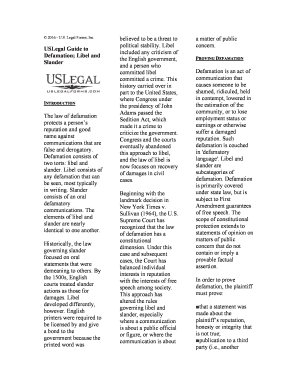
© 2016 - U.S. Legal Forms, Inc USLegal Guide to Defamation; Libel and Slander INTRODUCTION The law of defamation protects a person’s reputation and good name against communications that are false and derogatory. Defamation consists of two torts: libel and slander. Libel consists of any defamation that can be seen, most typically in writing. Slander consists of an oral defamatory communications. The elements of libel and slander are nearly identical to one another. Historically, the law governing slander focused on oral statements that were demeaning to others. By the 1500s, English courts treated slander actions as those for damages. Libel developed differently, however. English printers were required to be licensed by and give a bond to the government because the printed word was believed to be a threat to political stability. Libel included any criticism of the English government, and a person who committed libel committed a crime. This history carried over in part to the United States, where Congress under the presidency of John Adams passed the Sedition Act, which made it a crime to criticize the government. Congress and the courts eventually abandoned this approach to libel, and the law of libel is now focuses on recovery of damages in civil cases. Beginning with the landmark decision in New York Times v. Sullivan (1964), the U.S. Supreme Court has recognized that the law of defamation has a constitutional dimension. Under this case and subsequent cases, the Court has balanced individual interests in reputation with the interests of free speech among society. This approach has altered the rules governing libel and slander, especially where a communication is about a public official or figure, or where the communication is about a matter of public concern. P ROVING DEFAMATION Defamation is an act of communication that causes someone to be shamed, ridiculed, held in contempt, lowered in the estimation of the community, or to lose employment status or earnings or otherwise suffer a damaged reputation. Such defamation is couched in 'defamatory language'. Libel and slander are subcategories of defamation. Defamation is primarily covered under state law, but is subject to First Amendment guarantees of free speech. The scope of constitutional protection extends to statements of opinion on matters of public concern that do not contain or imply a provable factual assertion. In order to prove defamation, the plaintiff must prove: ■that a statement was made about the plaintiff’s reputation, honesty or integrity that is not true; ■publication to a third party (i.e., another person hears or reads the statement); and ■the plaintiff suffers damages as a result of the statement. Examples of defamatory statements are virtually limitless and may include any of the following: ■The communication that imputes a serious crime involving moral turpitude or a felony■A communication that exposes a plaintiff to hatred■A communication that reflects negatively on the plaintiff’s character, morality, or integrity■A communication that impairs the plaintiff’s financial well-being■A communication that suggests that the plaintiff suffers from a physical or mental defect that would cause others to refrain from associating with the plaintiff. One question with which courts have struggled is how to determine which standard should govern whether a statement is defamatory. Many statements may be viewed as defamatory by some individuals, but the same statement may not be viewed as defamatory by others. In some instances, the context of a statement may determine whether the statement is defamatory. The Restatement provides as follows: “The meaning of a communication is that which the recipient correctly, or mistakenly but reasonably, understands that it was intended to express.” Courts generally will take into account extrinsic facts and circumstances in determining the meaning of the statement. Thus, even where two statements are identical in their words, one may be defamatory while the other is not, depending on the context of the statements. In a defamation action, the recipient of a communication must understand that the defendant intended to refer to the plaintiff in the communication. Even where the recipient mistakenly believes that a communication refers to the plaintiff, this belief, so long as it is reasonable, is sufficient. It is not necessary that the communication refer to the plaintiff by name. A defendant may publish defamatory material in the form of a story or novel that apparently refers only to fictitious characters, where a reasonable person would understand that a particular character actually refers to the plaintiff. This is true even if the author states that he or she intends for the work to be fictional. In some circumstances, an author who publishes defamatory matter about a group or class of persons may be liable to an individual member of the group or class. This may occur when: (1) the communication refers to a group or class so small that a reader or listener can reasonably understand that the matter refers to the plaintiff; and (2) the reader or listener can reasonably conclude that the communication refers to the individual based on the circumstances of the publication. Generally, courts require a plaintiff to prove that he or she has been defamed in the eyes of the community or within a defined group within the community. Juries usually decide this question. Defamation is a difficult wrong to prove, as there are various factors that are to be taken into consideration. The court must evaluate the defendant’s investigation, or lack there of, concerning the accuracy of the statement. How thoroughly the investigation was handled will reflect upon the nature and interest of the person who communicated the statement. Generally, defamation damages will not be awarded if the defendant had an honest but yet mistaken belief in the truth of the statement. The amount of damages that can be awarded is a matter of subjective determination for the court, based on all the facts and circumstances in each case. Another requirement in libel and slander cases is that the defendant must have published defamatory information about the plaintiff. Publication certainly includes traditional forms, such as communications included in books, newspapers, and magazines, but it also includes oral remarks. So long as the person to whom a statement has been communicated can understand the meaning of the statement, courts will generally find that the statement has been published. F AULT At common law, once a plaintiff proved that a statement was defamatory, the court presumed that the statement was false. The rules did not require that the defendant know that the statement was false or defamatory in nature. The only requirement was that the defendant must have intentionally or negligently published the information. In New York Times v. Sullivan, the Supreme Court recognized that the strict liability rules in defamation cases would lead to undesirable results when members of the press report on the activities of public officials. Under the strict liability rules of common law, a public official would not have to prove that a reporter was aware that a particular statement about the official was false in order to recover from the reporter. This could have the effect of deterring members of the press from commenting on the activities of a public official. Under the rules set forth in Sullivan, a public official cannot recover from a person who publishes a communication about a public official’s conduct or fitness unless the defendant knew that the statement was false or acted in reckless disregard of the statements truth or falsity. This standard is referred to as “actual malice,” although malice in this sense does not mean ill-will. Instead, the actual malice standard refers to the defendant’s knowledge of the truth or falsity of the statement. Public officials generally include employees of the government who have responsibility over affairs of the government. In order for the First Amendment rule to apply to the public official, the communication must concern a matter related directly to the office. Later cases expanded the rule to apply to public figures. A public figure is someone who has gained a significant degree of fame or notoriety in general or in the context of a particular issue or controversy. Even though these figures have no official role in government affairs, they often hold considerable influence over decisions made by the government or by the public. Examples of public figures are numerous and could include, for instance, celebrities, prominent athletes, or advocates who involve themselves in a public debate. Where speech is directed at a person who is neither a public official nor a public figure, the case of Gertz v. Robert Welsh, Inc. (1974) and subsequent decisions have set forth different standards. The Court in Gertz determined that the actual malice standard established in New York Times v. Sullivan should not apply where speech concerns a private person. However, the Court also determined that the common law strict liability rules impermissibly burden publishers and broadcasters. Under the Restatement (Second) of Torts, a defendant who publishes a false and defamatory communication about a private individual is liable to the individual only if the defendant acts with actual malice (applying the standard under New York Times v. Sullivan) or acts negligently in failing to ascertain whether a statement was false or defamatory . D EFENSES TO DEFAMATION Consent: Where a plaintiff consents to the publication of defamatory matter about him or her, then this consent is a complete defense to a defamation action. Truth: Proving that the alleged defamatory statement is true will defend against claims for damages. The common law traditionally presumed that a statement was false once a plaintiff proved that the statement was defamatory. Under modern law, a plaintiff who is a public official or public figure must prove falsity as a prerequisite for recovery. Some states have likewise now provided that falsity is an element of defamation that any plaintiff must prove in order to recover. Where this is not a requirement, truth serves as an affirmative defense to an action for libel or slander. A statement does not need to be literally true in order for this defense to be effective. Courts require that the statement is substantially true in order for the defense to apply. This means that even if the defendant states some facts that are false, if the “gist” or “sting” of the communication is substantially true, then the defendant can rely on the defense. Absolute Privilege: Some statements, while libelous or slanderous, are absolutely privileged in the sense that the statements can be made without fear of a lawsuit for slander. The best example is a statement made in a court of law. An untrue statement made by a witness about a person in court which damages that person’s reputation will generally not cause liability to the witness as far as slander is concerned. However, if the statement is untrue, and the person knows the statement is untrue, the crime of perjury may have been committed. Some defendants are protected from liability in a defamation action based on the defendant’s position or status. These privileges are referred to as absolute privileges and may also be considered immunities. In other words, the defense is not conditioned on the nature of the statement or upon the intent of the actor in making a false statement. In recognizing these privileges, the law recognizes that certain officials should be shielded from liability in some instances. Absolute privileges apply to the following proceedings and circumstances: (1) judicial proceedings; (2) legislative proceedings; (3) some executive statements and publications; (4) publications between spouses; and (5) publications required by law. Absolute Privilege: Some defendants are protected from liability in a defamation action based on the defendant’s position or status. These privileges are referred to as absolute privileges and may also be considered immunities. In other words, the defense is not conditioned on the nature of the statement or upon the intent of the actor in making a false statement. In recognizing these privileges, the law recognizes that certain officials should be shielded from liability in some instances. Absolute privileges apply to the following proceedings and circumstances: (1) judicial proceedings; (2) legislative proceedings; (3) some executive statements and publications; (4) publications between spouses; and (5) publications required by law. Conditional Privilege: Other privileges do not arise as a result of the person making the communication, but rather arise from the particular occasion during which the statement was made. These privileges are known as conditional, or qualified, privileges. A defendant is not entitled to a conditional privilege without proving that the defendant meets the conditions established for the privilege. Generally, in order for a privilege to apply, the defendant must believe that a statement is true and, depending on the jurisdiction, either have reasonable grounds for believing that the statement was true or not have acted recklessly in ascertaining the truth or falsity of the statement. Conditional privileges apply to the following types of communications: ■A statement that is made for the protection of the publisher’s interest■A statement that is made for the protection of the interests of a third person■A statement that is made for the protection of common interest■A statement that is made to ensure the well- being of a family member■A statement that is made where the person making the communication believes that the public interest requires communication of the statement to a public officer or other official■A statement that is made by an inferior state officer who is not entitled to an absolute privilege Opinion: Opinions are not defamatory without containing a factual assertion. Defamation requires that the statement contains specific facts that can be proved untrue. For example, “The waiters and waitresses at Acme Restaurant are too slow and the food is too spicy.” This is a statement of opinion. “I got food poisoning at Acme Restaurant” is potentially a defamatory statement if, in fact, the restaurant can prove that you never contracted food poison. D EFAMATION PER SE Damages for libel may be limited to actual damages unless there is malicious intent. It does not have to be proven that actual harm to your reputation occurred to collect damages for libel if it is defamatory per se, such as: * The communication affects your business, trade or profession (loss of business, discharge, demotion, etc.), * Implies you committed a crime, * Leads on that you have a loathsome disease, * Or suggests that you are somehow sexually impure.

Useful tips on arranging your ‘Libel File’ online

Are you fed up with the inconvenience of handling paperwork? Look no further than airSlate SignNow, the premier electronic signature platform for individuals and businesses. Bid farewell to the monotonous task of printing and scanning documents. With airSlate SignNow, you can effortlessly fill out and sign paperwork online. Take advantage of the extensive tools included in this user-friendly and cost-effective platform and transform your method of document administration. Whether you need to authorize forms or gather eSignatures, airSlate SignNow manages it all with ease, needing only a few clicks.

Follow this comprehensive guide:

  1. Log into your account or sign up for a complimentary trial with our service.
  2. Click +Create to upload a file from your device, cloud, or our templates library.
  3. Open your ‘Libel File’ in the editor.
  4. Click Me (Fill Out Now) to complete the form on your end.
  5. Add and designate fillable fields for others (if required).
  6. Continue with the Send Invite settings to request eSignatures from others.
  7. Download, print your copy, or convert it into a reusable template.

No need to worry if you wish to collaborate with others on your Libel File or send it for notarization—our platform provides everything you need to accomplish these tasks. Create an account with airSlate SignNow today and enhance your document management to a new standard!

Here is a list of the most common customer questions. If you can’t find an answer to your question, please don’t hesitate to reach out to us.

Need help? Contact Support

The best way to complete and sign your libel file form

Save time on document management with airSlate SignNow and get your libel file form eSigned quickly from anywhere with our fully compliant eSignature tool.

How to Sign a PDF Online How to Sign a PDF Online

How to complete and sign paperwork online

In the past, dealing with paperwork required lots of time and effort. But with airSlate SignNow, document management is easy and fast. Our powerful and user-friendly eSignature solution allows you to easily fill out and eSign your libel file form online from any internet-connected device.

Follow the step-by-step guidelines to eSign your libel file form template online:

  • 1.Sign up for a free trial with airSlate SignNow or log in to your account with password credentials or SSO authorization option.
  • 2.Click Upload or Create and import a file for eSigning from your device, the cloud, or our form catalogue.
  • 3.Click on the document name to open it in the editor and utilize the left-side toolbar to complete all the empty areas accordingly.
  • 4.Put the My Signature field where you need to eSign your sample. Type your name, draw, or upload a picture of your handwritten signature.
  • 5.Click Save and Close to accomplish editing your completed form.

As soon as your libel file form template is ready, download it to your device, save it to the cloud, or invite other individuals to eSign it. With airSlate SignNow, the eSigning process only requires a few clicks. Use our powerful eSignature solution wherever you are to manage your paperwork effectively!

How to Sign a PDF Using Google Chrome How to Sign a PDF Using Google Chrome

How to complete and sign paperwork in Google Chrome

Completing and signing documents is easy with the airSlate SignNow extension for Google Chrome. Installing it to your browser is a fast and beneficial way to manage your forms online. Sign your libel file form sample with a legally-binding electronic signature in just a couple of clicks without switching between programs and tabs.

Follow the step-by-step guide to eSign your libel file form template in Google Chrome:

  • 1.Go to the Chrome Web Store, find the airSlate SignNow extension for Chrome, and install it to your browser.
  • 2.Right-click on the link to a form you need to approve and choose Open in airSlate SignNow.
  • 3.Log in to your account using your password or Google/Facebook sign-in option. If you don’t have one, you can start a free trial.
  • 4.Use the Edit & Sign toolbar on the left to complete your template, then drag and drop the My Signature option.
  • 5.Upload a photo of your handwritten signature, draw it, or simply enter your full name to eSign.
  • 6.Verify all data is correct and click Save and Close to finish modifying your paperwork.

Now, you can save your libel file form sample to your device or cloud storage, email the copy to other individuals, or invite them to electronically sign your form with an email request or a secure Signing Link. The airSlate SignNow extension for Google Chrome enhances your document processes with minimum effort and time. Try airSlate SignNow today!

How to Sign a PDF in Gmail How to Sign a PDF in Gmail How to Sign a PDF in Gmail

How to fill out and sign paperwork in Gmail

When you receive an email with the libel file form for approval, there’s no need to print and scan a file or download and re-upload it to a different program. There’s a much better solution if you use Gmail. Try the airSlate SignNow add-on to rapidly eSign any paperwork right from your inbox.

Follow the step-by-step guidelines to eSign your libel file form in Gmail:

  • 1.Navigate to the Google Workplace Marketplace and locate a airSlate SignNow add-on for Gmail.
  • 2.Install the tool with a related button and grant the tool access to your Google account.
  • 3.Open an email containing an attached file that needs signing and utilize the S key on the right sidebar to launch the add-on.
  • 4.Log in to your airSlate SignNow account. Select Send to Sign to forward the document to other parties for approval or click Upload to open it in the editor.
  • 5.Put the My Signature field where you need to eSign: type, draw, or import your signature.

This eSigning process saves efforts and only requires a few clicks. Utilize the airSlate SignNow add-on for Gmail to update your libel file form with fillable fields, sign forms legally, and invite other parties to eSign them al without leaving your mailbox. Enhance your signature workflows now!

How to Sign a PDF on a Mobile Device How to Sign a PDF on a Mobile Device How to Sign a PDF on a Mobile Device

How to complete and sign paperwork in a mobile browser

Need to rapidly submit and sign your libel file form on a smartphone while doing your work on the go? airSlate SignNow can help without the need to set up additional software programs. Open our airSlate SignNow solution from any browser on your mobile device and add legally-binding eSignatures on the go, 24/7.

Follow the step-by-step guide to eSign your libel file form in a browser:

  • 1.Open any browser on your device and follow the link www.signnow.com
  • 2.Create an account with a free trial or log in with your password credentials or SSO option.
  • 3.Click Upload or Create and import a file that needs to be completed from a cloud, your device, or our form catalogue with ready-made templates.
  • 4.Open the form and fill out the blank fields with tools from Edit & Sign menu on the left.
  • 5.Put the My Signature area to the sample, then enter your name, draw, or upload your signature.

In a few easy clicks, your libel file form is completed from wherever you are. Once you're done with editing, you can save the file on your device, create a reusable template for it, email it to other people, or ask them to electronically sign it. Make your paperwork on the go speedy and efficient with airSlate SignNow!

How to Sign a PDF on iPhone How to Sign a PDF on iPhone

How to complete and sign paperwork on iOS

In today’s business community, tasks must be done quickly even when you’re away from your computer. With the airSlate SignNow application, you can organize your paperwork and approve your libel file form with a legally-binding eSignature right on your iPhone or iPad. Set it up on your device to close deals and manage forms from anywhere 24/7.

Follow the step-by-step guide to eSign your libel file form on iOS devices:

  • 1.Go to the App Store, search for the airSlate SignNow app by airSlate, and install it on your device.
  • 2.Launch the application, tap Create to upload a form, and select Myself.
  • 3.Choose Signature at the bottom toolbar and simply draw your autograph with a finger or stylus to eSign the sample.
  • 4.Tap Done -> Save right after signing the sample.
  • 5.Tap Save or take advantage of the Make Template option to re-use this paperwork in the future.

This process is so straightforward your libel file form is completed and signed in a few taps. The airSlate SignNow app works in the cloud so all the forms on your mobile device are kept in your account and are available any time you need them. Use airSlate SignNow for iOS to boost your document management and eSignature workflows!

How to Sign a PDF on Android How to Sign a PDF on Android

How to fill out and sign paperwork on Android

With airSlate SignNow, it’s simple to sign your libel file form on the go. Install its mobile application for Android OS on your device and start boosting eSignature workflows right on your smartphone or tablet.

Follow the step-by-step guide to eSign your libel file form on Android:

  • 1.Go to Google Play, search for the airSlate SignNow app from airSlate, and install it on your device.
  • 2.Log in to your account or create it with a free trial, then upload a file with a ➕ option on the bottom of you screen.
  • 3.Tap on the imported document and select Open in Editor from the dropdown menu.
  • 4.Tap on Tools tab -> Signature, then draw or type your name to eSign the template. Fill out blank fields with other tools on the bottom if needed.
  • 5.Use the ✔ key, then tap on the Save option to finish editing.

With a user-friendly interface and full compliance with major eSignature standards, the airSlate SignNow app is the perfect tool for signing your libel file form. It even works without internet and updates all document adjustments once your internet connection is restored and the tool is synced. Complete and eSign forms, send them for eSigning, and make multi-usable templates whenever you need and from anyplace with airSlate SignNow.

Sign up and try Libel file form
  • Close deals faster
  • Improve productivity
  • Delight customers
  • Increase revenue
  • Save time & money
  • Reduce payment cycles