Establishing secure connection…Loading editor…Preparing document…

Louisiana Motion to Amend Sentence

This template is fully customizable. Edit the text, fill out the fields, and send it for signature. Give it a try!
Louisiana Motion to Amend Sentence

What the Louisiana Motion to Amend Sentence Is

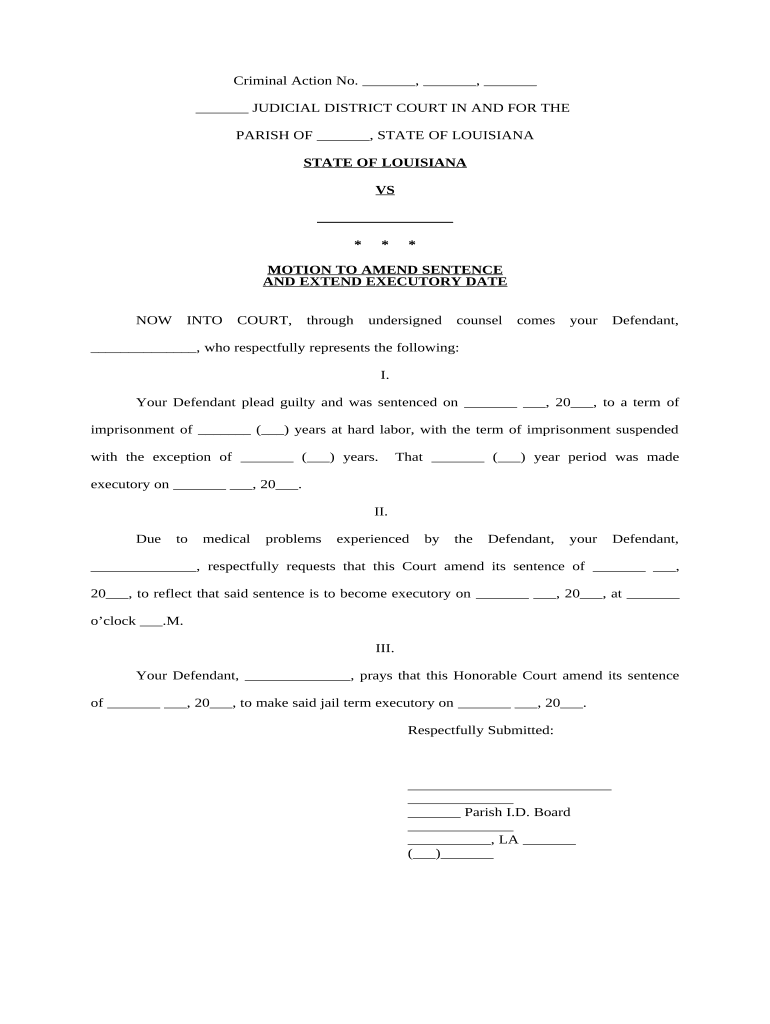
A Louisiana Motion to Amend Sentence is a written request filed with the sentencing court asking the judge to change one or more aspects of an imposed sentence. Typical grounds include clerical errors, newly discovered evidence affecting sentencing calculations, or legal errors preserved for review. The motion may request modification of term length, credit for time served, or correction of a sentencing entry. Procedures vary by parish and judge; the moving party must follow local rules for format, service, and filing to preserve rights and obtain consideration.

Why Filing This Motion Matters

A properly prepared motion allows the court to correct sentence errors, clarify record entries, or adjust custodial or credit calculations without initiating a new appeal. Where permitted, the motion can avoid additional litigation and limit collateral consequences.

Why Filing This Motion Matters

Who Typically Prepares and Files This Motion

Choose the filer and service method required by the local rule; attorneys must include appropriate certificates of service and counsel contact information.

  • Defense attorneys filing on behalf of clients to correct sentencing computations or clerical errors.
  • Pro se defendants seeking relief for time-credit adjustments or recording mistakes.
  • Probation officers or court staff submitting ministerial corrections to docket or commitment papers.

Core Elements to Include in the Motion

A concise, properly structured motion helps the judge and clerk process the request quickly. Include clear relief language and supporting facts tied to legal grounds.

Caption

Court name, case number, parties, and judge — matches the original sentencing judgment and docket exactly.
Title

Clear motion title such as 'Motion to Amend Sentence' stating the specific sentence element to be changed.

Statement of Facts

Brief factual background limited to material sentencing facts, dates, and citations to the judgment or commitment order.

Legal Grounds

Identify statutory or procedural authority (e.g., clerical correction, miscalculation of credit) supporting relief.

Requested Relief

Precisely state what the court should enter (e.g., correct term length, award credit, amend entry).

Signature Block

Signature, printed name, bar number if attorney, address, phone, and certificate of service verifying parties served.

Step-by-Step: Prepare and File the Motion

Follow this sequence to prepare a complete motion and reduce return-for-correction risk.

  • 01
    Draft Motion: Prepare motion text following local court form and required elements.
  • 02
    Attach Exhibits: Include judgment, commitment papers, or other supporting documents.
  • 03
    Sign and Date: Sign physically or with an accepted e-signature and date MM/DD/YYYY.
  • 04
    File and Serve: File with clerk per local e-filing or in-person rules and serve opposing counsel.

Filing and Court Review Workflow

Typical processing moves from filing to clerk review to judge consideration; timing differs by parish and court calendar.

  • Electronic Filing: Upload documents via the court's e-filing portal when available.
  • Clerk Intake: Clerk checks format, case number, and service certificate for compliance.
  • Judge Review: Judge or assigned magistrate reviews substance and determines whether a hearing is needed.
  • Order Issued: Court issues written order granting, denying, or setting a hearing for the motion.

Configure an Online Workflow for the Motion

Set up a repeatable online workflow to prepare, sign, and submit motions electronically while preserving a complete audit trail.

Field Configuration
Document Template Create a reusable motion template with fillable fields for names and case numbers.
Signature Field Require signer name, date, and role (attorney or pro se) for authenticity.
Attachment Rules Include required exhibits and force-upload checks for supporting documents.
Notification Auto-notify opposing counsel and provide certificate of service record.

Technical Considerations for eFiling and eSigning

When using an eSignature platform, retain a tamper-evident PDF and an audit trail showing signer identity, timestamp, and IP for court evidentiary needs.

  • Accepted Formats: Most courts accept PDF/A or standard PDF documents for filings.
  • Authentication: Courts may require attorney bar verification, account-based e-filing, or multi-factor authentication.
  • Integrations: Look for solutions that integrate with case management systems and cloud storage providers.

Security and Compliance Features to Preserve Record Integrity

Encryption: TLS 1.2/1.3; AES-256 at rest
Audit Trail: Timestamps, IP, and action logs
Access Controls: Role-based permissions
HIPAA Support: Requires BAA for PHI
ESIGN / UETA: Compliant with federal and most state laws
Tamper Evidence: Signed PDFs show integrity checks

Risks and Consequences of Defective Filings

Motion Rejection: Clerk may refuse defective filings
Waived Issues: Procedural defects can waive relief
Delay: Incorrect service delays resolution
Sanctions: Frivolous motions risk sanctions
Lost Opportunity: Deadlines may bar subsequent relief
Confidentiality Risk: Improper redaction exposes private data

Common Preparation Pitfalls to Avoid

  • Using an incorrect case number or court caption that prevents clerk matching and delays processing.
  • Failing to attach the underlying judgment or commitment order referenced in the motion, weakening the court record.
  • Omitting a certificate of service or incorrect service method, causing the motion to be procedurally defective.
  • Relying on informal email or noncompliant signatures that the court may not accept as authoritative.

eSignature Vendor Pricing Snapshot

Vendor pricing and baseline features vary; signNow is shown first for quick comparison of starting price, trial availability, bulk-send, audit trail, and HIPAA support.

signNow DocuSign Adobe Sign PandaDoc HelloSign
Starting Price $8/user/mo $15/user/mo $14/user/mo $19/user/mo $15/user/mo
Free Trial 7-day free trial No No Yes, limited Yes, limited
Bulk Send Yes Yes Yes Yes No
Audit Trail Yes Yes Yes Yes Yes
HIPAA Compliant Yes Yes Yes No No

Typical Timing and Scheduling Considerations

Timing depends on local court calendars and whether the motion requires a hearing; plan for clerk processing and possible response windows.

File Early:

Submit as soon as error or new information is discovered to avoid waiver

Clerk Review:

Clerk may take days to weeks to docket and circulate the motion

Response Window:

Opposing party may have a set period to respond under local rules

Hearing Scheduling:

If required, hearings are scheduled per judge availability and docket congestion

Order Entry:

Court issues a written order or minute entry resolving the motion

Frequently Asked Questions and Troubleshooting

Answers to common procedural and technical questions help reduce avoidable rejections and speed court processing.


Need help? Contact support

be ready to get more
Join over 28 million airSlate SignNow users