Establishing secure connection…Loading editor…Preparing document…

Minutes of First Meeting of Board of Directors

This template is fully customizable. Edit the text, fill out the fields, and send it for signature. Give it a try!
Minutes of First Meeting of Board of Directors

What the Minutes of First Meeting of Board of Directors Are

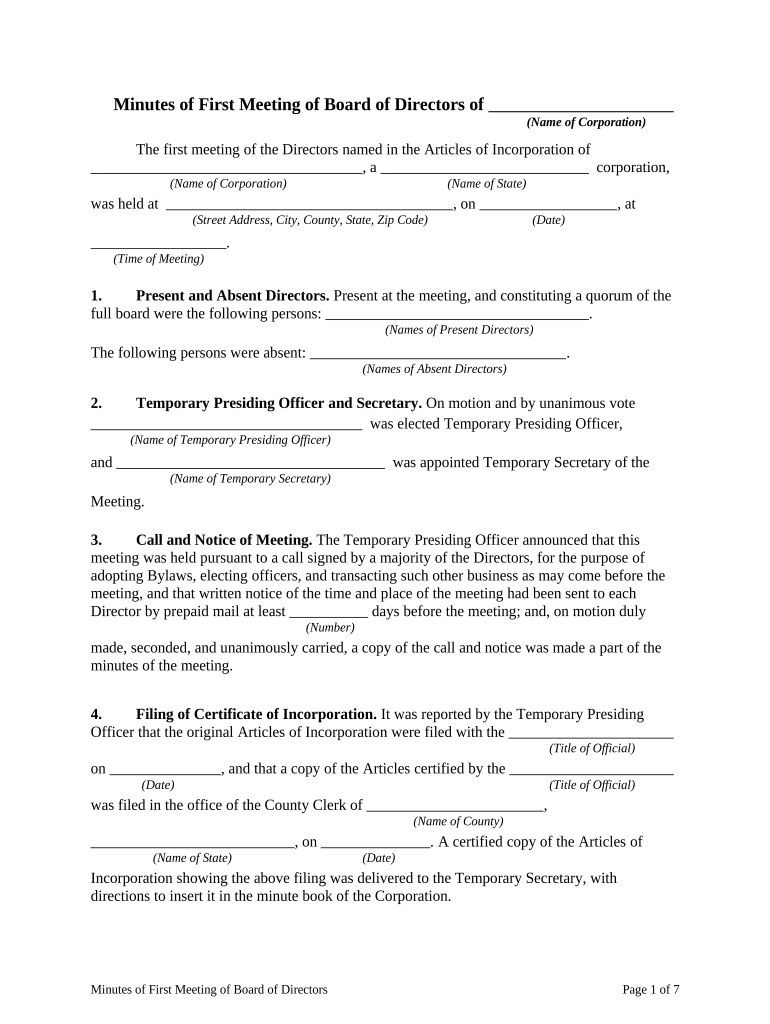
Minutes of the first meeting of the board of directors are the official written record documenting actions taken when a corporation or LLC convenes its initial board meeting after formation. They record attendees, officer and director elections or appointments, adoption of bylaws, issuance of shares or membership interests, appointment of officers, and authorizations for bank accounts and corporate contracts. These minutes become part of the corporate record and support compliance with state corporate law, internal governance, and later due diligence or audit reviews. A clear first-meeting record helps preserve corporate formalities and protect limited liability.

Why Accurate First-Meeting Minutes Matter

Proper minutes establish governance actions, evidence corporate decisions, and reduce liability risk by demonstrating that the board acted according to bylaws and law. They support bookkeeping, investor due diligence, and regulatory compliance while creating a durable record for future reference.

Why Accurate First-Meeting Minutes Matter

Who Typically Prepares and Uses These Minutes

The first-meeting minutes are prepared by the corporate secretary or counsel and reviewed by directors and officers.

  • Corporate secretaries or general counsel preparing the official record for the company
  • Board members and officers who must confirm elections, appointments, and approvals
  • Investors, lenders, or auditors who review governance and capitalization actions

Core Elements Every First-Meeting Minutes Should Include

A professional first-meeting minute should be concise, chronological, and include formal resolutions and signatures where appropriate to create an auditable corporate record.

Meeting Details

Date, time, and physical or virtual location of the meeting and how notice was delivered to directors.
Attendance

List of directors present, absent, and any attendees such as counsel or accountants, plus records of proxies or consents.

Officer Elections

Formal motions and votes to elect initial officers, with names, titles, and effective dates for each appointment.

Bylaws Adoption

Resolution adopting the company bylaws or operating agreement and any immediate amendments or transitional provisions.

Capitalization

Authorizations for issuance of shares or membership interests, stock certificates, and approvals of initial capitalization.

Authorizations

Resolutions authorizing bank accounts, signatories, corporate contracts, and filing of formation documents or tax elections.

Essential Data Fields for the Minutes

Company Name: Full legal entity name
Formation Date: Date of incorporation/formation
Meeting Date: MM/DD/YYYY format
Attendees: Directors and officers present
Resolutions: Short titles of motions passed
Recorder: Name and title of minute taker

Step-by-Step: Preparing the First-Meeting Minutes

Follow these steps to turn meeting notes into a formal, board-approved record that can be filed in the corporate minute book.

  • 01
    Draft Minutes: Draft immediately after the meeting while details remain fresh.
  • 02
    Include Resolutions: Record formal motions, votes, and any conditions.
  • 03
    Circulate to Board: Share the draft with directors for review and corrections.
  • 04
    Approve and File: Obtain approval, apply signatures, and store in the minute book.

Typical Digital Workflow for Completing and Storing Minutes

A repeatable workflow reduces errors and ensures all approvals and evidence are captured for a compliant record.

Step Action
Drafting Secretary prepares initial draft from meeting notes
Review Board reviews and proposes edits
Signatures Officers sign; eSignature captures audit trail
Archival Store final PDF in secure corporate minute book

Digital Tools and Security Considerations for Minutes

Maintain a controlled minute book with access logs and backup copies to support legal and financial reviews; ensure the platform meets required compliance standards.

  • Audit Trail: Capture timestamps, IP, and signer authentication
  • File Formats: Export as PDF/A for durable archival
  • Access Controls: Limit edit rights and record version history

Where Minutes Are Sent and How They Are Used

Minutes are distributed internally and retained for legal compliance; certain stakeholders may receive copies depending on company practice.

  • Corporate File: Final minutes saved to the company minute book or secure repository
  • Board Members: Copy provided to all directors and key officers
  • Investors and Lenders: Provide copies on request during due diligence
  • External Advisors: Share with counsel or accountants as needed

Timelines and Typical Deadlines to Observe

Prepare and approve minutes promptly and retain according to legal and internal timing expectations to preserve evidence of corporate decisions.

Draft Promptly:

Prepare draft within 7–14 days after the meeting

Board Approval:

Circulate and approve minutes at the next board meeting or by written consent

Banking Actions:

Provide signed minutes to banks when opening accounts or adding signatories

Investor Reporting:

Share material resolutions with investors according to agreements

Regulatory Filings:

Minutes themselves typically are not filed with SoS; keep for audits and inspections

Risks from Incomplete or Incorrect Minutes

Piercing Liability: Loss of corporate protections
Contract Challenges: Third parties may dispute authority
Bank Delays: Account openings or signatory changes delayed
Investor Disputes: Claims over funding or ownership terms
Audit Findings: Negative findings in financial or compliance audits
Regulatory Scrutiny: Increased questions from authorities

Common Mistakes When Preparing First-Meeting Minutes

  • Failing to record vote counts or who moved and seconded motions, leaving intent ambiguous and open to challenge.
  • Using informal or vague language for resolutions instead of precise motion text tied to actions and effective dates.
  • Delaying drafting and approval, which makes recollection unreliable and increases the risk of errors or omissions.
  • Not capturing electronic authentication details when using eSignatures, weakening the evidentiary value of the signed minutes.

eSignature Vendor Pricing and Feature Snapshot for Signing Minutes

Compare common pricing and feature points across solutions when selecting an eSignature provider to authenticate and store minutes.

signNow DocuSign Adobe Sign PandaDoc HelloSign
Starting Price $8/user/mo $15/user/mo $14/user/mo $19/user/mo $15/user/mo
Free Trial 7-day free trial Varies by vendor Varies by vendor Varies by vendor Varies by vendor
Bulk Send Yes Yes Yes Yes No
Audit Trail Yes Yes Yes Yes Yes
HIPAA Compliant Yes Yes Yes No No

Frequently Asked Questions About First-Meeting Minutes

Answers to common questions about preparing, approving, signing, and storing minutes, with practical steps to resolve issues.


Need help? Contact support

be ready to get more
Join over 28 million airSlate SignNow users