Establishing secure connection…Loading editor…Preparing document…

Work Hours and Reporting Policy

This template is fully customizable. Edit the text, fill out the fields, and send it for signature. Give it a try!
Work Hours and Reporting Policy

What the Work Hours and Reporting Policy Is

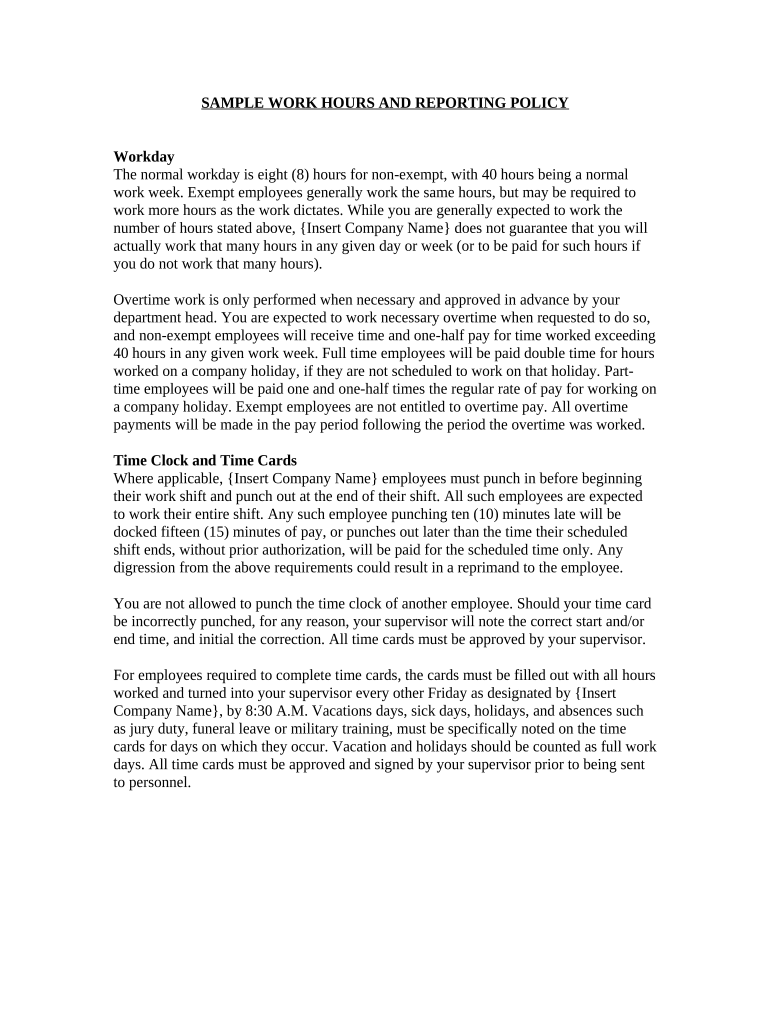
A Work Hours and Reporting Policy documents how employees record scheduled hours, breaks, overtime eligibility, and the process for submitting time records for payroll and compliance purposes. It defines who must report hours, acceptable reporting methods, approval workflows, and retention rules for time records. The policy aligns internal payroll practices with federal and state wage-and-hour rules, clarifies managerial responsibilities for review and approval, and describes corrective steps when records are inaccurate or late. Use the policy to set consistent expectations and demonstrate compliance during audits or government reviews.

Why a Clear Policy Matters

A clear Work Hours and Reporting Policy reduces payroll errors, protects against wage-and-hour claims, and supports consistent payroll processing. It helps employees understand reporting expectations while giving managers an objective review process for approvals and exceptions.

Why a Clear Policy Matters

Who Uses and Maintains This Policy

The policy is maintained by HR and payroll teams and applies to all non-exempt and exempt employees subject to time reporting in the organization.

  • Human Resources and Payroll teams — draft, distribute, and update the policy and maintain records.
  • Supervisors and Managers — review and approve timesheets and resolve discrepancies.
  • Employees and Contractors — report hours, breaks, and exceptions per policy instructions.

Core Elements to Include

A professional policy is concise, legally informed, and operationally specific so it can be applied consistently across departments and during audits.

Scope

Specify which job classes, locations, and employment types are covered, including exempt versus non-exempt distinctions and any contractor exceptions.
Work Hours

Define regular workday and workweek start/stop times, standard shift lengths, scheduled vs. flexible arrangements, and how partial-day absences are reported.

Overtime Rules

Describe when overtime is payable, calculation method (e.g., time-and-a-half after 40 hours), pre-approval requirements, and rounding practices for time entries.

Reporting Procedure

List accepted reporting channels, timesheet cadence, submission deadlines, who must approve, and escalation steps for late or disputed entries.

Recordkeeping

State the retention period for time records, location of storage, required audit trails for edits, and how to correct historical entries.

Exceptions

Explain meal and rest break rules, accommodation procedures, call-back pay, travel time, on-call expectations, and how to document authorized deviations.

Step-by-Step: Implementing and Distributing the Policy

Follow these sequential steps to publish the policy, collect acknowledgments, and operationalize reporting.

  • 01
    Draft Policy: HR drafts policy reflecting federal and state rules and internal payroll procedures.
  • 02
    Management Review: Legal and payroll review for compliance and operational feasibility.
  • 03
    Employee Notification: Distribute the policy and collect signed acknowledgments from covered employees.
  • 04
    Ongoing Monitoring: Supervisors enforce reporting and payroll audits monitor compliance.

Configuring the Digital Time-Reporting Workflow

Configure the workflow so submissions, approvals, and audit trails are automated and auditable in your timekeeping system.

Field Configuration
Template Name Use a clear name including location and effective date.
Signers and Approvers Assign employee, supervisor, and payroll approver roles per job group.
Field Types Use required time fields, optional notes, and conditional exception fields.
Retention Settings Set automatic retention per policy and export capability for audits.

How Submission and Approval Typically Flow

A clear submission and approval flow reduces delays and ensures payroll receives verified hours on time.

  • Employee Submits: Employee completes timesheet or mobile entry before the cut-off.
  • Supervisor Reviews: Manager checks accuracy, requests corrections, or approves entries.
  • Payroll Processes: Payroll imports approved records and prepares pay runs.
  • Record Archive: Signed records and audit trails are stored for the retention period.

Digital Tools and Integration Requirements

Choose a platform that supports secure file formats, audit trails, and integrations with payroll and HRIS systems.

  • File formats: PDF, DOCX, and CSV exports supported
  • Integrations: Works with HRIS and payroll systems
  • Authentication: Supports email, SMS, and stronger methods

Recurring Timelines and Payroll Cutoffs

Establish explicit reporting and approval deadlines to ensure timely payroll processing and statutory compliance.

Pay Period Submission:

Submit timesheets within 3 business days after period end

Supervisor Approval Cutoff:

Managers approve submissions at least 24 hours before payroll cutoff

Overtime Authorization:

Pre-approval required when reasonably practicable; document exception reasons

Payroll Processing Window:

Payroll imports approved records per established schedule

Record Corrections:

Corrections submitted within one pay cycle unless payroll audit dictates otherwise

Key Implementation Milestones

Track milestones to ensure policy adoption, training, and ongoing compliance monitoring proceed on schedule.

01

Policy Approval

Legal and executive sign-off on policy content and enforcement rules.

02

Employee Rollout

Distribute policy and collect signed acknowledgments from employees.

03

System Launch

Enable digital timekeeping and integrate with payroll systems.

04

First Audit

Conduct an initial compliance check after the first full pay cycle.

Common Preparation Pitfalls to Avoid

  • Unclear definitions of 'work' vs. 'on-call' time causing inconsistent reporting and disputes in wage calculation.
  • Absent or lax approval rules that allow retroactive unverified edits and obscure the audit trail for payroll.
  • Failure to align with state meal and rest break laws, leading to unpaid break disputes or compliance risks.
  • Not preserving signed acknowledgments and audit logs for the required retention period before deletion.

Penalties and Risks from Policy Errors

Wage Claims: Back pay and liquidated damages possible
I-9 Penalties: $281–$2,789 per violation
Overtime Liability: Unpaid overtime increases employer exposure
Regulatory Audit: Forced remediation and extended record requests
Reputational Harm: Employee trust and retention damage
Civil Litigation: Class or collective action risk

Essential Information to Collect and Store

Employee Name: Full legal name
Employee ID: Company-assigned identifier
Work Location: City and state
Time Entries: Start/stop and break times
Approver: Supervisor name and timestamp
Signature: Signed acknowledgment or e-sign

Who Signs This Policy

HR Manager

HR Manager — responsible for drafting and updating policy language, coordinating legal review, and configuring the timekeeping system. They maintain change logs and oversee distribution and training for all covered employees.

Employee

Employee Acknowledgment — employees sign to confirm understanding and agree to comply with reporting rules. Signed acknowledgments are stored for the retention period and used if disputes arise.

eSignature Vendor Comparison for Policy Acknowledgments

Compare common features and starting prices for eSignature platforms used to collect policy acknowledgments and maintain audit trails; signNow is listed first per vendor comparison standards.

signNow DocuSign Adobe Sign PandaDoc HelloSign
Starting Price $8/user/mo $15/user/mo $14/user/mo $19/user/mo $15/user/mo
Free Trial 7-day free trial, no credit card required Varies by vendor Varies by vendor Varies by vendor Varies by vendor
Bulk Send Yes (Business Premium) Yes Yes Yes No
Audit Trail Yes Yes Yes Yes Yes
HIPAA Compliant Yes (BAA) Yes Yes No No

Frequently Asked Questions and Troubleshooting

Answers to common questions about signing, storing, and enforcing a Work Hours and Reporting Policy, including legal validity and digital signature considerations.


Need help? Contact support

be ready to get more
Join over 28 million airSlate SignNow users