Establishing secure connection…Loading editor…Preparing document…

Joint Complaint

This template is fully customizable. Edit the text, fill out the fields, and send it for signature. Give it a try!
Joint Complaint

What a Joint Complaint Is and when parties use it

A Joint Complaint is a formal legal pleading filed when two or more plaintiffs bring the same cause of action together against one or more defendants. It combines each plaintiff's claims into a single document that sets out parties, jurisdictional facts, factual allegations, causes of action, and the specific relief requested. Joint complaints streamline court filings, align procedural deadlines, and reduce duplicative pleadings; they also require clear identification of each plaintiff's capacity, signature blocks, and service information. Court rules govern whether joint filings are permissible and how claims should be styled.

Why filing a Joint Complaint can matter

Filing a Joint Complaint centralizes related claims, reduces duplicative filings, and can shorten adjudication by consolidating evidence and discovery. It clarifies each party's allegations and requested relief while helping counsel and the court manage case schedules and service of process efficiently.

Why filing a Joint Complaint can matter

Who typically prepares and files a Joint Complaint

Plaintiffs, law firms, and in-house counsel commonly use a Joint Complaint when multiple claimants share common facts or legal theories.

  • Small plaintiffs combining consumer claims to reduce filing costs and discovery duplication.
  • Law firms coordinating class-related or consolidated actions across clients and jurisdictions.
  • Government entities or agencies joining enforcement actions against the same defendant.

Core sections your Joint Complaint should include

Core sections of a professional Joint Complaint ensure clarity about parties, factual allegations, claims, relief sought, jurisdiction, and service details to meet court requirements.

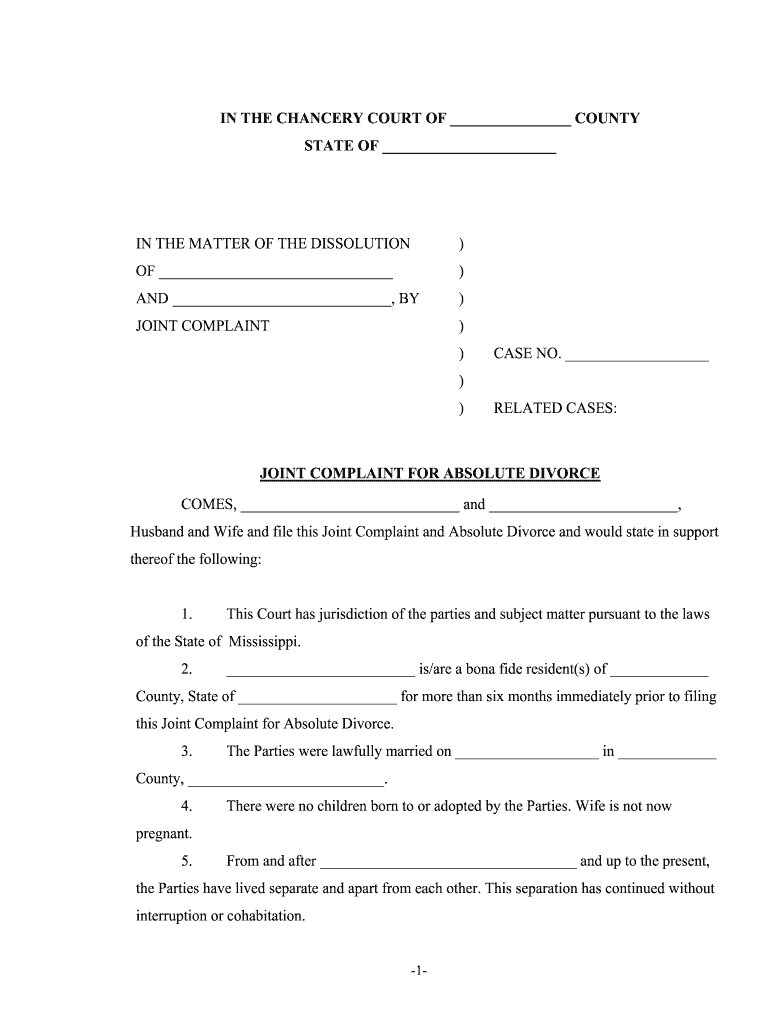
Caption

Include court name, docket number (if known), county, names of all plaintiffs and defendants, and a title such as 'Joint Complaint' so the filing matches local pleading formats.
Jurisdiction

State the basis for subject-matter and personal jurisdiction, venue, and any federal-question or diversity allegations, including citizenship and amount in controversy where required for the court's review.

Factual Allegations

Provide a clear, chronological narrative of facts linking plaintiffs and defendants to the conduct at issue, with dates, locations, acts, and how each plaintiff was harmed.

Causes of Action

List each legal claim separately, cite applicable statutes or common law grounds, and tie specific factual allegations to each element of the asserted causes of action.

Relief

Specify the remedies sought for each plaintiff—damages (itemized when possible), injunctive relief, declaratory relief, attorneys' fees, and any statutory penalties or costs.

Signatures

Include signature blocks for each plaintiff or counsel with printed name, bar number if applicable, mailing address, phone, email, and date signed per local rule.

Step-by-step: preparing and filing a Joint Complaint

Follow these steps to complete and prepare a Joint Complaint for filing and service under local court rules.

  • 01
    Gather Facts: Collect dates, witnesses, and supporting documents.
  • 02
    Draft Complaint: Draft allegations and separate counts for each plaintiff.
  • 03
    Review Procedure: Confirm local formatting, filing fees, and e-filing rules.
  • 04
    Sign & File: Obtain signatures and submit via clerk or e-filing.

Typical e-filing workflow settings to configure

Set up signer authentication, routing, and notification settings before sending documents for signature or e-filing.

Form Field Configuration and Use Setting | Instructions
Signer Authentication Method (SMS or Email) Email link | Optional SMS code or KBA
Signature Placement and Required Parties Signature boxes | One per plaintiff; counsel signature allowed
Document Routing Order Settings Sequential or parallel | Set signer order in workflow
Automatic Notices and Service Copies Email copies | Send to counsel and registered agents

From draft to court clerk: the filing flow

Typical filing and service workflow for a Joint Complaint, showing preparation, signature collection, e-filing submission, and proof of service steps.

  • Prepare: Assemble complaint, exhibits, and civil cover sheet.
  • Sign: Each plaintiff or counsel signs the signature block.
  • File: Submit via court e-filing system or clerk's office.
  • Serve: Serve defendants per state rules and file proof.

Technical checks before e-submitting or signing electronically

Use verified e-filing and e-signature platforms that meet court technical and authentication requirements before submitting.

  • Document Formats: PDF/A and DOCX support required
  • Integrations: Integrates with common case management systems
  • Authentication Methods: Email, SMS, KBA, or multi-factor

eSignature vendor snapshot for filing and signature workflows

Feature and starting price comparison to help select an eSignature provider for document collection and case workflows.

signNow DocuSign Adobe Sign PandaDoc HelloSign
Starting Price $8/user/mo $15/user/mo $14/user/mo $19/user/mo $15/user/mo
Free Trial 7-day free trial Varies Varies Varies Varies
Bulk Send Yes Yes Yes Yes No
Audit Trail Yes Yes Yes Yes Yes
HIPAA Compliant Yes Yes Yes No No

Essential data elements every Joint Complaint must contain

Plaintiff Names: Full legal names as on ID
Defendant Names: Legal entity or individual names
Addresses: Street, city, state, ZIP required
Dates: Enter dates as MM/DD/YYYY format
Claims: Legal grounds and statute citations
Signature Block: Signer name, date, counsel details

Consequences of an incorrect or defective Joint Complaint

Dismissal Risk: Claims dismissed for improper joinder
Sanctions: Sanctions under FRCP 11 possible
Statute of Limitations: Missed deadlines bar claims
Service Defects: Service errors delay proceedings
Evidence Loss: Poor document retention harms appeals
Fee Exposure: Attorney fee shifts or penalties

Common preparation and filing pitfalls to avoid

  • Combining plaintiffs without common legal or factual basis can prompt a motion to sever or dismiss, increasing costs and delaying resolution.
  • Failing to align allegations for each plaintiff (dates, injuries, damages) creates ambiguity that defendants exploit in motions to dismiss.
  • Not verifying local court formatting, filing fees, or e-filing procedures may lead to rejection or returned filings.
  • Incomplete signature blocks, missing counsel information, or inconsistent party names can produce service failures and procedural sanctions.

Practical best practices to strengthen a Joint Complaint

Follow these best practices to reduce rejection risk, protect client interests, and streamline joint case management across plaintiffs and counsel.

Confirm Common Legal Factual Basis for Joinder
Before filing, analyze whether plaintiffs share common questions of law or fact and whether joinder meets local rules; if not, consider separate complaints or coordinated filings to avoid motions to sever and preserve judicial efficiency.
Coordinate Counsel Roles and Service Process
Designate lead counsel, define service agents, and document who will handle notices, discovery obligations, and settlement communications to avoid missed deadlines and conflicting representations among co-plaintiffs.
Proofread and Verify Names and Dates
Check that each plaintiff's legal name, address, and critical dates match supporting affidavits and exhibits; ensure calculation of damages and jurisdictional facts is accurate to prevent challenges to standing or personal jurisdiction.
Preserve Original Documents, Exhibits, and Metadata
Collect and secure original exhibits, electronic files, and metadata; document chain-of-custody, maintain audit trails for electronic signatures, and retain records beyond minimum retention periods in case of appeals or discovery disputes.

Frequently asked questions about Joint Complaints

Answers to frequent questions about preparing, signing, filing, and maintaining a Joint Complaint under U.S. court and e-signature rules.


Need help? Contact support

be ready to get more
Join over 28 million airSlate SignNow users