Establishing secure connection… Loading editor… Preparing document…
Navigation

Fill and Sign the Mini Golf Course Layout Plan Design and Build Process Form
Fill and Sign the Mini Golf Course Layout Plan Design and Build Process Form

How it works

Open the document and fill out all its fields.
Apply your legally-binding eSignature.
Save and invite other recipients to sign it.

Rate template

4.7
55 votes
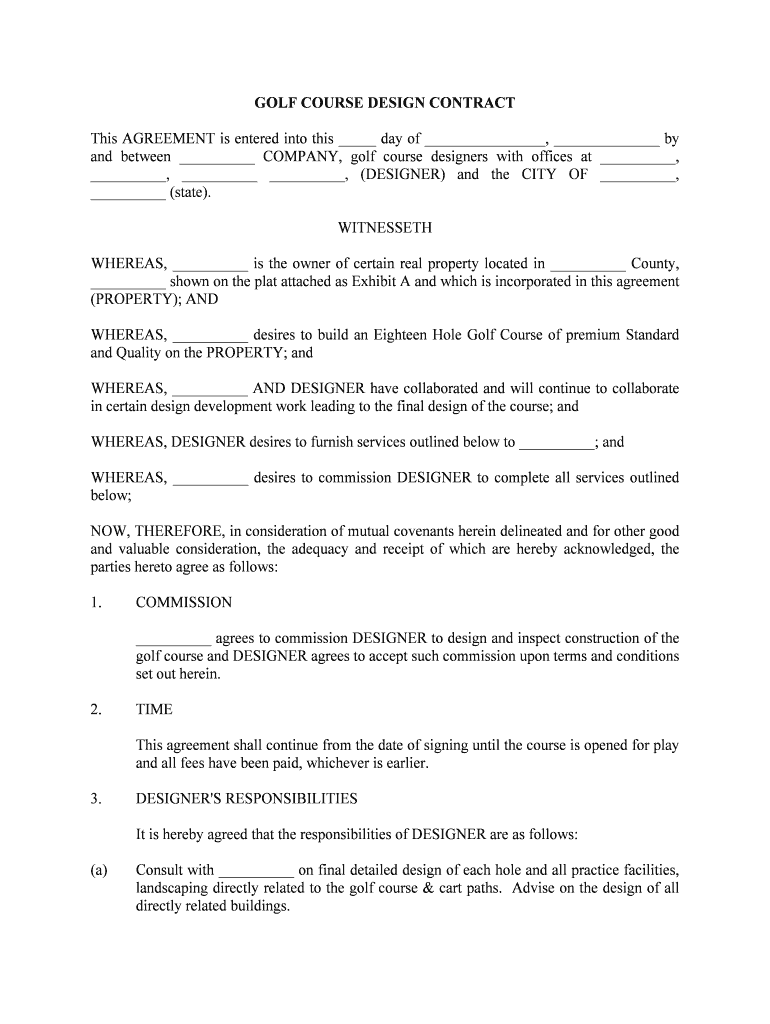
GOLF COURSE DESIGN CONTRACT This AGREEMENT is entered into this _____ day of ________________, ______________ by and between __________ COMPANY, golf course designers with offices at __________, __________, __________ __________, (DESIGNER) and the CITY OF __________, __________ (state). WITNESSETH WHEREAS, __________ is the owner of certain real property located in __________ County, __________ shown on the plat attached as Exhibit A and which is incorporated in this agreement (PROPERTY); ANDWHEREAS, __________ desires to build an Eighteen Hole Golf Course of premium Standard and Quality on the PROPERTY; andWHEREAS, __________ AND DESIGNER have collaborated and will continue to collaborate in certain design development work leading to the final design of the course; andWHEREAS, DESIGNER desires to furnish services outlined below to __________; andWHEREAS, __________ desires to commission DESIGNER to complete all services outlined below;NOW, THEREFORE, in consideration of mutual covenants herein delineated and for other good and valuable consideration, the adequacy and receipt of which are hereby acknowledged, the parties hereto agree as follows:1.COMMISSION__________ agrees to commission DESIGNER to design and inspect construction of the golf course and DESIGNER agrees to accept such commission upon terms and conditions set out herein.2. TIMEThis agreement shall continue from the date of signing until the course is opened for play and all fees have been paid, whichever is earlier.3. DESIGNER'S RESPONSIBILITIESIt is hereby agreed that the responsibilities of DESIGNER are as follows:(a)Consult with __________ on final detailed design of each hole and all practice facilities, landscaping directly related to the golf course & cart paths. Advise on the design of all directly related buildings. (b)Establish on site, with a mutually agreed engineer and/or surveyor, the sitting of tees, greens and centerline for the course, and all directly related buildings and landscape features for Agreement by __________.(c)Prepare detailed designs and specifications for the course in sufficient detail that such documents may be used, together with a Construction Contract, to obtain bids and/or negotiate a contract or contracts for the complete construction of the course and all ancillary non-building fixed systems and facilities directly related to the course and its maintenance.(d)Prepare drawings as follows:(I)Prepare plans for 3 (b) above.(II)Clearing plans.(III)Grading plans.(IV)Drainage plans (in conjunction with engineer) including environmental/erosion control elements.(V)Location of cart paths & bridges.(VI)Construction of tees and greens.(VII)Location of all directly related buildings.(VIII)Directly related landscape features,(in conjunction with land planner.)(e)Consult with __________, its employee(s), and a mutually acceptable agronomist in the selection of certified turf grasses and soil mixes best suited for the conditions prevailing on the PROPERTY. (The U.S.G.A. greens section would be suitable.)(f)Consult with __________, its employee(s), and mutually acceptable irrigation specialist sub-contractor to design a suitable irrigation system to support growth referred to in 3 (e) above and any special landscape features that might require irrigation.(g)Consult with __________, its employee(s) and its appointees and prepare the landscape plans and specifications as they relate to the golf course.(h)Consult with __________ and its employee(s) in the negotiation/bidding of all contracts and sub-contracts for the construction, irrigation & landscaping of the golf course.(i)Provide all drawings and documents relative to the design work that may be called for in the processing of all applications for approvals and permits for the construction and initial operation of the golf course, including environmental permits/approvals.(j)Inspect Golf Course construction work as often as is necessary for its completion in accordance with the plans and specification (except for reasonable vacation time) with special attention to: (I)Stripping and stock piling of topsoil.(II)Rough grading.(III)Green Construction.(IV) Final grading.(V)Irrigation system installation.(VI)Landscaping.(VII)Growing in and finishing.(k)Consult on certification of contractors, sub-contractors and suppliers claims for payment.(l)Ensure that all items under his control shall be completed to enable bidding of construction of the golf course to commence within _______ days after all necessary permits and approvals have been received.(m)Provide __________ with satisfactory proof of general liability insurance in amounts of not less than One Million Dollars per occurrence with __________ as an additional insured on the policy.4. __________'S RESPONSIBILITIES__________ shall designate a PROJECT MANAGER to be its representative in regard to all its responsibilities under this contract. It is hereby agreed that the responsibilities of (a)Communicate to DESIGNER full and detailed design requirements for the golf course.(b)Provide DESIGNER with all surveys and surveying services in a manner conducive to the timely expedition of the golf course design and construction.(c) Retain the services of:(I) A golf course agronomist.(II)A golf course maintenance contractor.(III)A consulting engineer.(d) __________ may elect to provide a landscape designer and an environmental botanist upon recommendation or the PROJECT MANAGER and the DESIGNER.(e)Make available the services of the consultants or employees mentioned in 4 (c) above in a timely manner as requested by DESIGNER so as to facilitate the expedition of the preparation of the final design and specifications for the golf course. Lack of availability of those persons or lack of timely performance by them shall not adversely affect this agreement as it pertains to timely performance by DESIGNER.(f) Give DESIGNER unfettered access to the consulting engineers appointed for the project and support DESIGNER in his efforts to obtain material or opinions from such engineers. lack of timely performance by engineers shall not adversely affect this agreement as it pertains to timely performance by DESIGNER.(g) Inform DESIGNER in writing of any easements, set backs, rights of way, or special conditions, that pertain to the land shown at Exhibit A.(h)Ensure that DESIGNER has access to any existing aerial photographs, infra-red photographs, topographic maps, boundary surveys, utility surveys, hydrographic studies, soil and sub-soil studies, and other data necessary for the proper performance of his duties.(i) Respond to all verbal, written or drawn communication from DESIGNER in a timely manner.(j) Inform DESIGNER in a timely manner of any deficiencies and/or problems known to __________ during the design and construction of the golf course.(k) Obtain or cause to be obtained all permits and approvals necessary for the timely completion of the DESIGNER'S commission. (See 3 (i)(l) Pay all legitimate bills emanating from the golf course design and construction in a timely manner and hold DESIGNER harmless from any demand for such payment resulting from the signed contract or contracts with all contractors, sub-contractors and suppliers.5.COMPENSATION OF DESIGNERIn payment for the performance of the services and responsibilities contained herein __________ AND DESIGNER hereby agree to an all-in fee of __________ Thousand ($__________,000) Dollars. Such fees shall be payable as follows:Phase 1Routing PlanInspection of site, taking clients instructions and noting all physical constraints before preparation of routing plan.Fee: $__________,000.00Phase 2 Design DevelopmentMeeting with local and permitting authorities and other members of the professional team to finalize all proposed constraints. Development of agreed plan to establish finished grades for client approval and for submission to permitting agencies.Fee: $__________,000.00 Phase 3Working DrawingsPreparing full working drawings for the bidding and construction of the golf course. Finalization of budgetary cost estimates.Fee: $__________,000.00Phase 4 Bidding and Selection of ContractorMonitoring bidding process and advising on selection of contractor.Fee:$__________,000.00Construction InspectionsUndertaking construction inspections with sufficient frequency to ensure that the project is being constructed in accordance with the contract documents.Fee: $__________,000.00Total: $_________,0,000.00If permits for construction of the golf course are not received by __________. __________ shall have the right to suspend payments until permits are received. In the event __________ determines in its discretion not to proceed with the permit process and notifies DESIGNER of its intent to abandon the Project and terminate this contract, DESIGNER shall be entitled to payment for services actually provided but in no event shall DESIGNER receive in excess of compensation beyond Phase 2.6.PAYMENT(a)Payment for Phase 1 shall be made within 30 days of the execution of the contract.(b) For Phase 2, payment in the amount of $00.00 shall be made upon completion of the grading plan and documents necessary to allow bidding on grading contract. The balance of the Phase II fee to be paid upon closing of the bond issue for financing of the golf course.(c) Compensation for Phases 3, 4 and 5 shall be paid at the rate of $00.00 per month commencing the first month after closing of the bond issue.(d) __________ may suspend monthly payments for compensation on Phases 3,4 and 5 in order to insure that the final installment, due upon completion of construction, will amount to $00.00. 7.BUSINESS EXPENSESDESIGNER shall bear all out-of-pocket business expenses relating to normal and necessary service provided for the project. All extraordinary expenses shall be borne by __________, but may not be incurred without its prior approval. A travel & accommodation budget shall be set at $_______________ to cover site visits. All costs incurred above this budget shall be for the account of DESIGNER.8.RESTRICTIONSThis agreement shall not restrict DESIGNER from engaging in other activities and businesses and shall not be construed as an exclusive agreement or an agreement requiring his provision of services to __________ on a daily basis.However, DESIGNER warrants that he will pursue his responsibilities under this agreement in a highly responsible manner and shall render to CITY OF __________ services of the highest quality and integrity.9.OWNERSHIP OF DOCUMENTSIt is hereby agreed that all documents generated by the DESIGNER in the performance of his responsibilities under this agreement shall remain the property of DESIGNER until payment has been completed in accordance with this Contract, at which time they shall become the property of __________.However, access by __________ to these documents before completion shall not be denied.10. AMENDMENTSThis agreement once signed shall not be amended, waived, added to or changed without the prior written consent of both __________ and DESIGNER.11.ASSIGNMENTSThis agreement shall not be assigned by either __________ or DESIGNER without the prior written consent of the other party except where the assignee is a wholly-owned subsidiary or entity.12. CONSULTANTS__________ reserves the right to hire a consultant(s) of its choice at __________'S expense to assist in the completion of the course to __________'S satisfaction. 13.TERMINATIONThis contract may be terminated for cause by either party on 10 days notice. Cause shall be failure to perform the obligations and responsibilities as provided herein. However, if cause is based on nonpayment, notice of said default and subsequent payment prior to termination date shall not be construed as "cause" for termination.14. SUCCESSION OF RESPONSIBILITYShould __________, for reasons of health or for circumstances beyond his control, be unable to provide personal inspection services for any period during the project, Mr. __________ reserves the right to appoint an inspector of similar ability to act on his behalf. __________ shall have the right to approve such inspector. This arrangement shall not materially affect this contract and Mr. __________ shall reassume his total involvement with the project as soon as he is able.15.BINDING EFFECTThis agreement shall be binding in its entirety to both __________ and DESIGNER and shall inure to the benefits of their heirs, successors or assigns.16. NOTICENotices under this Agreement shall be in writing or printing and shall be delivered by any means as follows:AS TO __________: ______________________P.O. Box ________________________, __________AS TO DESIGNER:____________________ Golf Company____________________, __________ __________or to such other party or address as may from time to time be recorded in writing by either party, to either party.All date sensitive notices or communications shall be by U.S. Mail, Certified Return Receipt of facsimile to both parties.17. HEADINGSHeadings shall not limit or otherwise affect the meaning or interpretation of this agreement; they are for reference only. 18.SURVIVALAll covenants, agreements, representations and warranties made herein or otherwise made in writing by any party hereto shall survive the execution and delivery of this Agreement and the consummation of the transaction contemplated hereby.19.SEVERABILITYIf any part of this Agreement or any other Agreement entered into pursuant hereto is contrary to, prohibited by or deemed invalid under applicable law or regulation, such provision shall be inapplicable and deemed omitted to the extent so contrary, prohibited or invalid, but the remainder hereof shall not be invalidated thereby and shall be given full force and effect so far as possible.20. WAIVERSThe failure or delay of either party at any time to require performance by the other party of any provision of this Agreement, even if known, shall not affect the right of such party to require performance of that provision or to exercise any right, power of remedy hereunder, any waiver by either party of any breach of any provision of this Agreement should not be construed as a waiver of any continuing or succeeding breach of such provision, a waiver of the provision itself, or a waiver of any right, power or remedy under this Agreement.21. JURISDICTIONThe parties acknowledge that a substantial portion of negotiations, anticipated performance and execution of this agreement occurred or shall occur in __________, __________ County, __________ and that, therefore, without limiting the jurisdiction or venue of any other federal or state courts, each of the parties irrevocably and unconditionally (a) agrees that any suit, action or legal proceeding arising out of or relating to this Agreement may be brought in the courts of record of __________ County, __________ (b) consents to the jurisdiction of such courts in any suit action or proceeding (c) waives any objection which it may have to the laying of venue of any such suit, action or proceeding in such courts; and (d) agrees that service of any court paper may be effected on such party by mail, as provided under applicable laws or court rules in said State.22. GOVERNMENTAL LAWThis agreement and all transactions contemplated by this Agreement shall be governed by, and construed and enforced in accordance with, the internal laws of the State of __________ without regard to principles of conflicts of laws.23. ENTIRE AGREEMENT This Agreement represents the entire understanding and Agreement between the parties with respect to the subject matter hereof, and supersedes all other negotiations, understandings and representations (if any) made by and between such parties.24.AUTHORITYBoth __________ and DESIGNER by signing this agreement warrant that they are authorized to do so on behalf of those that they ostensibly represent. IN WITNESS WHEREOF, the parties have executed this agreement on........................... as to CITY OF __________........................... as to DESIGNER.WITNESSES:CITY OF __________________________________ BY:_________________________________________________ITS ___________________________________ COMPANY________________________BY:_________________________________________________ITS _________________________

Convenient tips for finalizing your ‘Mini Golf Course Layout Plan Design And Build Process’ online

Are you fed up with the inconvenience of dealing with paperwork? Look no further than airSlate SignNow, the leading eSignature tool for individuals and small to medium-sized businesses. Bid farewell to the monotonous task of printing and scanning documents. With airSlate SignNow, you can easily finalize and sign documents online. Take advantage of the extensive features included in this user-friendly and cost-effective platform and transform your approach to document administration. Whether you need to authenticate forms or gather electronic signatures, airSlate SignNow manages it all seamlessly, with merely a few clicks.

Adhere to this comprehensive guide:

  1. Log into your account or register for a complimentary trial with our service.
  2. Click +Create to upload a file from your device, cloud storage, or our form library.
  3. Access your ‘Mini Golf Course Layout Plan Design And Build Process’ in the editor.
  4. Click Me (Fill Out Now) to set up the document on your end.
  5. Insert and designate fillable fields for others (if necessary).
  6. Continue with the Send Invite options to solicit eSignatures from others.
  7. Save, print your version, or convert it into a multi-use template.

No need to worry if you need to work together with your coworkers on your Mini Golf Course Layout Plan Design And Build Process or send it for notarization—our solution has everything you require to accomplish such tasks. Sign up with airSlate SignNow today and enhance your document management to new heights!

Here is a list of the most common customer questions. If you can’t find an answer to your question, please don’t hesitate to reach out to us.

Need help? Contact Support

The best way to complete and sign your mini golf course layout plan design and build process form


Save time on document management with airSlate SignNow and get your mini golf course layout plan design and build process form eSigned quickly from anywhere with our fully compliant eSignature tool.

How to Sign a PDF Online How to Sign a PDF Online

How to complete and sign paperwork online

Previously, coping with paperwork required lots of time and effort. But with airSlate SignNow, document management is quick and simple. Our robust and easy-to-use eSignature solution lets you easily fill out and electronically sign your mini golf course layout plan design and build process form online from any internet-connected device.

Follow the step-by-step guide to eSign your mini golf course layout plan design and build process form template online:

  • 1.Register for a free trial with airSlate SignNow or log in to your account with password credentials or SSO authorization option.
  • 2.Click Upload or Create and import a form for eSigning from your device, the cloud, or our form catalogue.
  • 3.Click on the document name to open it in the editor and use the left-side toolbar to complete all the blank areas accordingly.
  • 4.Place the My Signature field where you need to approve your form. Type your name, draw, or upload a photo of your handwritten signature.
  • 5.Click Save and Close to finish modifying your completed form.

After your mini golf course layout plan design and build process form template is ready, download it to your device, save it to the cloud, or invite other people to electronically sign it. With airSlate SignNow, the eSigning process only takes several clicks. Use our powerful eSignature tool wherever you are to deal with your paperwork efficiently!


How to Sign a PDF Using Google Chrome How to Sign a PDF Using Google Chrome

How to fill out and sign forms in Google Chrome

Completing and signing documents is easy with the airSlate SignNow extension for Google Chrome. Adding it to your browser is a fast and effective way to deal with your forms online. Sign your mini golf course layout plan design and build process form sample with a legally-binding eSignature in a few clicks without switching between applications and tabs.

Follow the step-by-step guide to eSign your mini golf course layout plan design and build process form in Google Chrome:

  • 1.Navigate to the Chrome Web Store, locate the airSlate SignNow extension for Chrome, and install it to your browser.
  • 2.Right-click on the link to a document you need to approve and select Open in airSlate SignNow.
  • 3.Log in to your account with your credentials or Google/Facebook sign-in option. If you don’t have one, sign up for a free trial.
  • 4.Use the Edit & Sign toolbar on the left to fill out your template, then drag and drop the My Signature option.
  • 5.Add a picture of your handwritten signature, draw it, or simply type in your full name to eSign.
  • 6.Verify all the details are correct and click Save and Close to finish modifying your form.

Now, you can save your mini golf course layout plan design and build process form sample to your device or cloud storage, email the copy to other individuals, or invite them to eSign your form with an email request or a protected Signing Link. The airSlate SignNow extension for Google Chrome enhances your document processes with minimum effort and time. Try airSlate SignNow today!


How to Sign a PDF in Gmail How to Sign a PDF in Gmail How to Sign a PDF in Gmail

How to fill out and sign forms in Gmail

Every time you get an email with the mini golf course layout plan design and build process form for approval, there’s no need to print and scan a file or save and re-upload it to a different program. There’s a much better solution if you use Gmail. Try the airSlate SignNow add-on to rapidly eSign any documents right from your inbox.

Follow the step-by-step guide to eSign your mini golf course layout plan design and build process form in Gmail:

  • 1.Navigate to the Google Workplace Marketplace and look for a airSlate SignNow add-on for Gmail.
  • 2.Install the program with a corresponding button and grant the tool access to your Google account.
  • 3.Open an email with an attachment that needs signing and use the S key on the right sidebar to launch the add-on.
  • 4.Log in to your airSlate SignNow account. Opt for Send to Sign to forward the file to other people for approval or click Upload to open it in the editor.
  • 5.Place the My Signature option where you need to eSign: type, draw, or import your signature.

This eSigning process saves efforts and only requires a few clicks. Utilize the airSlate SignNow add-on for Gmail to update your mini golf course layout plan design and build process form with fillable fields, sign paperwork legally, and invite other people to eSign them al without leaving your inbox. Boost your signature workflows now!


How to Sign a PDF on a Mobile Device How to Sign a PDF on a Mobile Device How to Sign a PDF on a Mobile Device

How to fill out and sign documents in a mobile browser

Need to rapidly fill out and sign your mini golf course layout plan design and build process form on a mobile phone while doing your work on the go? airSlate SignNow can help without the need to set up additional software apps. Open our airSlate SignNow solution from any browser on your mobile device and add legally-binding electronic signatures on the go, 24/7.

Follow the step-by-step guide to eSign your mini golf course layout plan design and build process form in a browser:

  • 1.Open any browser on your device and go to the www.signnow.com
  • 2.Register for an account with a free trial or log in with your password credentials or SSO authentication.
  • 3.Click Upload or Create and import a file that needs to be completed from a cloud, your device, or our form collection with ready-made templates.
  • 4.Open the form and fill out the empty fields with tools from Edit & Sign menu on the left.
  • 5.Place the My Signature field to the form, then type in your name, draw, or add your signature.

In a few easy clicks, your mini golf course layout plan design and build process form is completed from wherever you are. When you're finished editing, you can save the file on your device, create a reusable template for it, email it to other people, or ask them to electronically sign it. Make your documents on the go prompt and productive with airSlate SignNow!


How to Sign a PDF on iPhone How to Sign a PDF on iPhone

How to fill out and sign documents on iOS

In today’s business community, tasks must be done quickly even when you’re away from your computer. Using the airSlate SignNow application, you can organize your paperwork and sign your mini golf course layout plan design and build process form with a legally-binding eSignature right on your iPhone or iPad. Install it on your device to conclude contracts and manage forms from anywhere 24/7.

Follow the step-by-step guide to eSign your mini golf course layout plan design and build process form on iOS devices:

  • 1.Open the App Store, search for the airSlate SignNow app by airSlate, and set it up on your device.
  • 2.Open the application, tap Create to upload a template, and choose Myself.
  • 3.Select Signature at the bottom toolbar and simply draw your autograph with a finger or stylus to eSign the sample.
  • 4.Tap Done -> Save after signing the sample.
  • 5.Tap Save or take advantage of the Make Template option to re-use this document later on.

This method is so easy your mini golf course layout plan design and build process form is completed and signed in just a couple of taps. The airSlate SignNow application works in the cloud so all the forms on your mobile device remain in your account and are available any time you need them. Use airSlate SignNow for iOS to enhance your document management and eSignature workflows!


How to Sign a PDF on Android How to Sign a PDF on Android

How to complete and sign documents on Android

With airSlate SignNow, it’s easy to sign your mini golf course layout plan design and build process form on the go. Set up its mobile app for Android OS on your device and start boosting eSignature workflows right on your smartphone or tablet.

Follow the step-by-step guide to eSign your mini golf course layout plan design and build process form on Android:

  • 1.Go to Google Play, search for the airSlate SignNow application from airSlate, and install it on your device.
  • 2.Log in to your account or register it with a free trial, then upload a file with a ➕ option on the bottom of you screen.
  • 3.Tap on the uploaded document and select Open in Editor from the dropdown menu.
  • 4.Tap on Tools tab -> Signature, then draw or type your name to electronically sign the template. Complete blank fields with other tools on the bottom if required.
  • 5.Use the ✔ button, then tap on the Save option to end up with editing.

With an easy-to-use interface and total compliance with primary eSignature standards, the airSlate SignNow app is the perfect tool for signing your mini golf course layout plan design and build process form. It even operates offline and updates all form modifications when your internet connection is restored and the tool is synced. Complete and eSign documents, send them for eSigning, and make re-usable templates anytime and from anyplace with airSlate SignNow.

Sign up and try Mini golf course layout plan design and build process form
  • Close deals faster
  • Improve productivity
  • Delight customers
  • Increase revenue
  • Save time & money
  • Reduce payment cycles

