eSign Presentation for Legal Mobile
Make the most out of your eSignature workflows with airSlate SignNow
Extensive suite of eSignature tools
Robust integration and API capabilities
Advanced security and compliance
Various collaboration tools
Enjoyable and stress-free signing experience
Extensive support
Keep your eSignature workflows on track
Our user reviews speak for themselves










Award-winning eSignature solution




eSignature demonstration for mobile legal
Are you seeking an effective method to handle your legal documents while on the move? With airSlate SignNow, you can conveniently eSign presentations for mobile legal, ensuring that you never overlook a crucial signature while preserving flexibility. This guide will lead you through the straightforward steps to get started with airSlate SignNow, a robust tool crafted to improve your document workflow.
Steps to create an eSignature demonstration for mobile legal
- Launch your browser and go to the airSlate SignNow website.
- Register for a free account or log into your current account.
- Select the document you want to eSign or send for signatures.
- If you intend to use this document often, convert it into a reusable template.
- Access the document to make necessary modifications: add fillable fields or input required details.
- Sign the document and incorporate signature fields for your recipients.
- Click 'Continue' to set up and send an eSignature request.
By following these steps, you can fully leverage airSlate SignNow's capabilities, simplifying your document signing process. Whether you are a small enterprise or part of a mid-sized organization, the platform is designed to effectively meet your needs, offering a comprehensive set of features for a signNow return on investment.
Ready to improve your document management workflow? Sign up for a complimentary airSlate SignNow trial today and discover how simple it is to eSign presentations for mobile legal, all with clear pricing and excellent support!
How it works
Rate your experience
-
Best ROI. Our customers achieve an average 7x ROI within the first six months.
-
Scales with your use cases. From SMBs to mid-market, airSlate SignNow delivers results for businesses of all sizes.
-
Intuitive UI and API. Sign and send documents from your apps in minutes.
A smarter way to work: —how to industry sign banking integrate
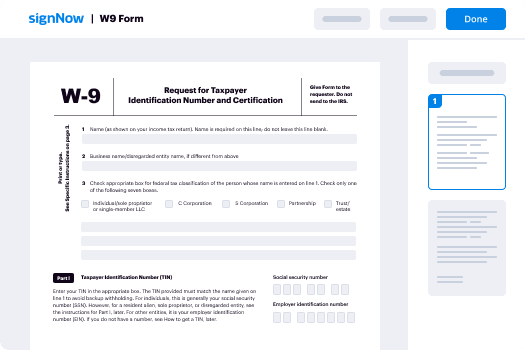
How to electronically sign & complete a document online
Document management isn't an easy task. The only thing that makes working with documents simple in today's world, is a comprehensive workflow solution. Signing and editing documents, and filling out forms is a simple task for those who utilize eSignature services. Businesses that have found reliable solutions to department e sign legal presentation mobile don't need to spend their valuable time and effort on routine and monotonous actions.
Use airSlate SignNow and department e sign legal presentation mobile online hassle-free today:
- Create your airSlate SignNow profile or use your Google account to sign up.
- Upload a document.
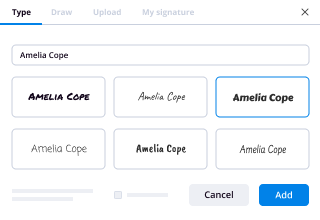
- Work on it; sign it, edit it and add fillable fields to it.
- Select Done and export the sample: send it or save it to your device.
As you can see, there is nothing complicated about filling out and signing documents when you have the right tool. Our advanced editor is great for getting forms and contracts exactly how you want/need them. It has a user-friendly interface and full comprehensibility, offering you total control. Sign up right now and start increasing your digital signature workflows with efficient tools to department e sign legal presentation mobile on the internet.
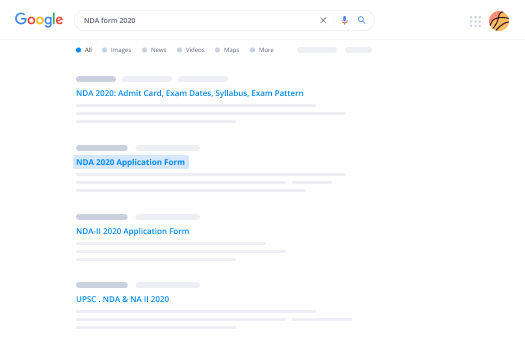
How to electronically sign and fill forms in Google Chrome
Google Chrome can solve more problems than you can even imagine using powerful tools called 'extensions'. There are thousands you can easily add right to your browser called ‘add-ons’ and each has a unique ability to enhance your workflow. For example, department e sign legal presentation mobile and edit docs with airSlate SignNow.
To add the airSlate SignNow extension for Google Chrome, follow the next steps:
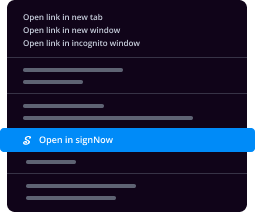
- Go to Chrome Web Store, type in 'airSlate SignNow' and press enter. Then, hit the Add to Chrome button and wait a few seconds while it installs.
- Find a document that you need to sign, right click it and select airSlate SignNow.
- Edit and sign your document.
- Save your new file to your account, the cloud or your device.
By using this extension, you avoid wasting time and effort on monotonous assignments like downloading the document and importing it to a digital signature solution’s catalogue. Everything is close at hand, so you can easily and conveniently department e sign legal presentation mobile.
How to electronically sign documents in Gmail
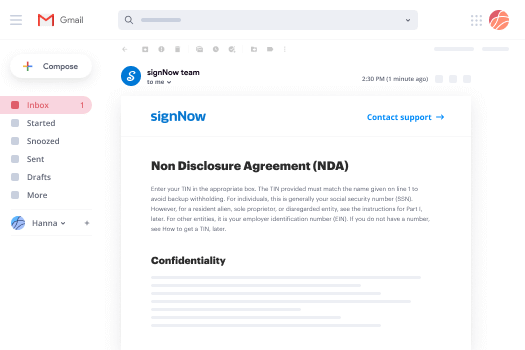
Gmail is probably the most popular mail service utilized by millions of people all across the world. Most likely, you and your clients also use it for personal and business communication. However, the question on a lot of people’s minds is: how can I department e sign legal presentation mobile a document that was emailed to me in Gmail? Something amazing has happened that is changing the way business is done. airSlate SignNow and Google have created an impactful add on that lets you department e sign legal presentation mobile, edit, set signing orders and much more without leaving your inbox.
Boost your workflow with a revolutionary Gmail add on from airSlate SignNow:
- Find the airSlate SignNow extension for Gmail from the Chrome Web Store and install it.
- Go to your inbox and open the email that contains the attachment that needs signing.
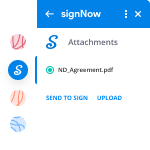
- Click the airSlate SignNow icon found in the right-hand toolbar.
- Work on your document; edit it, add fillable fields and even sign it yourself.
- Click Done and email the executed document to the respective parties.
With helpful extensions, manipulations to department e sign legal presentation mobile various forms are easy. The less time you spend switching browser windows, opening several profiles and scrolling through your internal data files searching for a template is more time for you to you for other crucial activities.
How to securely sign documents using a mobile browser
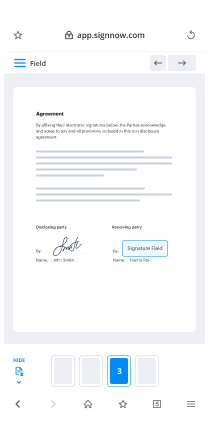
Are you one of the business professionals who’ve decided to go 100% mobile in 2020? If yes, then you really need to make sure you have an effective solution for managing your document workflows from your phone, e.g., department e sign legal presentation mobile, and edit forms in real time. airSlate SignNow has one of the most exciting tools for mobile users. A web-based application. department e sign legal presentation mobile instantly from anywhere.
How to securely sign documents in a mobile browser
- Create an airSlate SignNow profile or log in using any web browser on your smartphone or tablet.
- Upload a document from the cloud or internal storage.
- Fill out and sign the sample.
- Tap Done.
- Do anything you need right from your account.
airSlate SignNow takes pride in protecting customer data. Be confident that anything you upload to your account is secured with industry-leading encryption. Auto logging out will protect your profile from unauthorized access. department e sign legal presentation mobile from the phone or your friend’s mobile phone. Safety is essential to our success and yours to mobile workflows.
How to digitally sign a PDF document with an iPhone
The iPhone and iPad are powerful gadgets that allow you to work not only from the office but from anywhere in the world. For example, you can finalize and sign documents or department e sign legal presentation mobile directly on your phone or tablet at the office, at home or even on the beach. iOS offers native features like the Markup tool, though it’s limiting and doesn’t have any automation. Though the airSlate SignNow application for Apple is packed with everything you need for upgrading your document workflow. department e sign legal presentation mobile, fill out and sign forms on your phone in minutes.
How to sign a PDF on an iPhone
- Go to the AppStore, find the airSlate SignNow app and download it.
- Open the application, log in or create a profile.
- Select + to upload a document from your device or import it from the cloud.
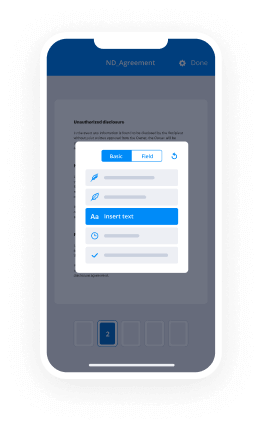
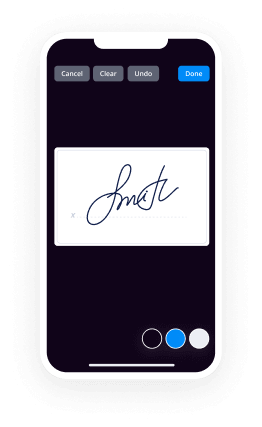
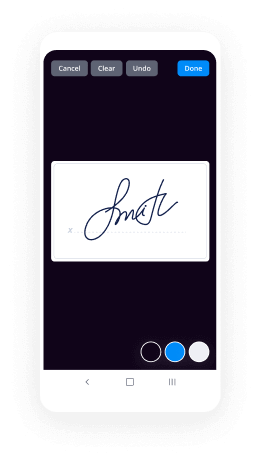
- Fill out the sample and create your electronic signature.
- Click Done to finish the editing and signing session.
When you have this application installed, you don't need to upload a file each time you get it for signing. Just open the document on your iPhone, click the Share icon and select the Sign with airSlate SignNow button. Your sample will be opened in the mobile app. department e sign legal presentation mobile anything. In addition, making use of one service for all your document management requirements, things are easier, better and cheaper Download the app right now!
How to digitally sign a PDF on an Android
What’s the number one rule for handling document workflows in 2020? Avoid paper chaos. Get rid of the printers, scanners and bundlers curriers. All of it! Take a new approach and manage, department e sign legal presentation mobile, and organize your records 100% paperless and 100% mobile. You only need three things; a phone/tablet, internet connection and the airSlate SignNow app for Android. Using the app, create, department e sign legal presentation mobile and execute documents right from your smartphone or tablet.
How to sign a PDF on an Android
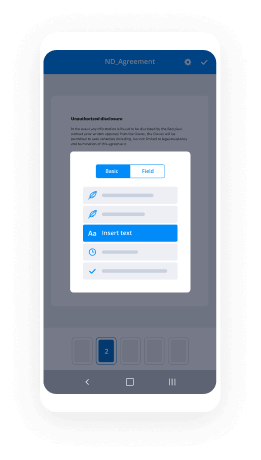
- In the Google Play Market, search for and install the airSlate SignNow application.
- Open the program and log into your account or make one if you don’t have one already.
- Upload a document from the cloud or your device.
- Click on the opened document and start working on it. Edit it, add fillable fields and signature fields.
- Once you’ve finished, click Done and send the document to the other parties involved or download it to the cloud or your device.
airSlate SignNow allows you to sign documents and manage tasks like department e sign legal presentation mobile with ease. In addition, the security of your info is priority. Encryption and private servers are used for implementing the latest capabilities in info compliance measures. Get the airSlate SignNow mobile experience and operate more effectively.





FAQs
-
What is the eSign Presentation for Legal Mobile feature in airSlate SignNow?
The eSign Presentation for Legal Mobile feature in airSlate SignNow allows users to create and manage legally binding electronic signatures directly from their mobile devices. This feature is designed specifically for legal professionals, enabling them to streamline the signing process and enhance productivity on the go.
-
How does airSlate SignNow's eSign Presentation for Legal Mobile improve document management?
With the eSign Presentation for Legal Mobile, users can easily organize, send, and track documents from anywhere, ensuring that legal processes are efficient and timely. This mobile feature integrates seamlessly with existing workflows, allowing for quick access to important documents and real-time updates.
-
Is there a cost associated with using the eSign Presentation for Legal Mobile feature?
Yes, airSlate SignNow offers various pricing plans that include access to the eSign Presentation for Legal Mobile feature. These plans are designed to be cost-effective, providing businesses with the flexibility to choose a solution that meets their specific needs without breaking the bank.
-
Can I integrate airSlate SignNow's eSign Presentation for Legal Mobile with other software?
Absolutely! airSlate SignNow's eSign Presentation for Legal Mobile can integrate with various third-party applications, including CRM and document management systems. This integration capability ensures a smooth workflow and enhances overall efficiency in your legal processes.
-
What are the security features included in the eSign Presentation for Legal Mobile?
The eSign Presentation for Legal Mobile includes robust security measures, such as encryption and secure access controls, to protect sensitive legal documents. airSlate SignNow is compliant with industry standards, ensuring that all signatures are legally binding and secure.
-
How user-friendly is the eSign Presentation for Legal Mobile feature?
airSlate SignNow's eSign Presentation for Legal Mobile is designed with user experience in mind, featuring an intuitive interface that makes it easy for anyone to navigate. Even users with minimal technical skills can quickly learn to send and sign documents effortlessly.
-
What types of documents can I eSign using the eSign Presentation for Legal Mobile?
You can eSign a wide range of documents using the eSign Presentation for Legal Mobile, including contracts, agreements, and legal forms. This versatility makes it an essential tool for legal professionals who need to manage various document types on the go.
-
What is the difference between a digital signature and an electronic signature in your professional opinion?
Both terms - “electronic signature” and “digital signature” - are often used interchangeably, they aren’t exactly the same. Electronic signatures could be considered virtual representations of a pen-and-paper (“wet”) signatures. Digital signatures, also called cryptographic signatures, are a type of electronic signature that’s coded and encrypted in order to prevent the impersonation of a signee, tampering, and improve security overall.The main difference is that a digital signature is mainly used to secure documents and is authorized by certification authorities while an electronic signature (e-signature, e-sign) is usually associated with a contract where the signer has got the intention to do so: Difference Between Digital Signature and Electronic SignatureE-signature helps an individual to show his agreement to the conditions and terms of an electronic service. It can also be used to confirm the identity of the message's creator. Many countries give the same legal importance and significance to e-signatures as to traditional ways of executing documents. Here are the features of some most popular tools in this area: Best E-Signature Software Reviews & Comparisons | 2019 List of Expert's ChoicesWith electronic signature tools you avoid signing digital documents by hand - which is tedious cause otherwise you need to print, sign and scan all that stuff - that’s why such tools are on the rise. If you work with such signatures often, maybe you need some simple free tool which is specialized exactly for your business tasks. It really depends on the purpose for which you need this to sign an already typed document - it is often better to use a specialized tool, like Draw Your Signature Online and Sign PDF - CreateMySignature.com (instead of a regular image editor) to streamline your business documents workflow.
-
What is Aadhar based e sign?
Aadhaar e-Sign is an online electronic signature service in India to facilitate an Aadhaar holder to digitally sign a document. The signature service is facilitated by authenticating the Aadhar holder via the Aadhar-based e-KYC (electronic Know Your Customer) service.- WikipediaTo e-Sign a document, one has to have an Aadhaar card and a mobile number registered with Aadhaar. With these two things, an Indian citizen can sign a document remotely without being physically present. e-sign service saves costs and time required to sign a document and it is also as legally valid as a handwritten signature or a digital signature done using a digital signature certificate.Benefits of Aadhaar based eSign:Instant signing: Aadhaar based signing service allows users to sign documents instantly using Aadhar numberEasy to use: The signers just need to have Aadhar number and registered mobile numberLegally valid: The Indian IT Act 2000 legalizes Aadhar e-signature as legally valid as a handwritten signatureI have come across various companies that that perform e-sign servicesThe best one I found is https://veri5digital.com
-
Are the mobile signatures used in Square, PayPal and Flint payment apps legally binding?
In all 50 states and territories of the US "Electronic Signatures" are viewed as enforceable and binding to all parties to the agreement(s). The electronic facsimile of a cardholder's signature is not just an artifact of Flint, but also of Square, PayPal and other mobile payment companies. You will also witness signature pads at all large retailers in the US.The First Electronic Signature Was Morse CodeThe case law signNowes back to the 1850s in the US where Morse Code was transmitted via Telegraphy [1].Saturday, June 10th, 1871, Samuel F. B. Morse sending his last telegraph message, his signature: "S ... F .-. B -... M -- O . . R . .. S ... E ." to a standing ovation.1869 And The First Legal Test Of An Electronic SignatureIn 1869 the New Hampshire Supreme Court decided a case that challenged if a telegraphed contract was valid. In the findings:"It makes no difference whether that operator writes the offer or the acceptance, with a steel pen an inch long attached to an ordinary penholder, or whether his pen be a copper wire a thousand miles long. In either case the thought is communicated to the paper by the use of the finger resting upon the pen; nor does it make any difference that in one case common record ink is used, while in the other case a more subtle fluid, known as electricity, performs the same office."This ruling has formed the foundation in US law all the way up to the Facsimile machine and the current finger signatures that are common to the current smartphone payment apps. The US codified the law more clearly in the E-Sign Act ( the Electronic Signatures in Global and National Commerce Act} from 2001 [2]. This expands upon the prior Uniform Electronic Transactions Act (UETA) [3].The E-Sign Act states:(a) IN GENERAL.—Notwithstanding any statute, regulation, or other rule of law (other than this title and title II), with respect to any transaction in or affecting interstate or foreign commerce—(1) a signature, contract, or other record relating to such transaction may not be denied legal effect, validity, or enforce- ability solely because it is in electronic form; and(2) a contract relating to such transaction may not be denied legal effect, validity, or enforceability solely because an electronic signature or electronic record was used in its formation.A Payment Card Transaction Is A Signed ContractA Payment Card transaction is a contract between the cardholder and the card issuing bank and indirectly the merchant. When a cardholder authorizes a bank for the use of a Payment Card they are also authorizing your approval of all transactions with or without a signature. Thus at the very least there is cardholder authorization for a transaction that was conducted using an Electronic Signature regardless of the E-Sign Act. But with the E-Sign Act the mark would be considered valid unless the cardholder contests or otherwise repudiates the transaction. This would be considered a Chargeback and it is another thing entirely (see: Brian Roemmele's answer to How do you prevent people from using chargebacks as a method for refunds?).Apple And A New IOS "Home Button", A Finger Print Electronic Signature SystemThe electronic signature will continue to evolve. In the future other unique identifiers will be used to confirm or authorize a payment card transaction. Look for Apple to release an integrated fingerprint scanner (for a multitude of reasons) in to new IOS devices that can be used as an electronic signature to confirm and authorize payment card transactions (see: Brian Roemmele's answer to Why did Apple buy AuthenTec?). This feature will form the basis of Apple's new iWallet and extension to Passbook. Image from the 2008 Apple patent 20100082444 showing NFC Logo and fingerprint scanner (using the older AuthenTec thin rectangular finger print scanner AES2750). I believe the actual fingerprint scanner will be the Home Button using another AuthenTec product. A long JourneyThe electronic signature has come a very long way from the days of Mr. Morse's invention. However the intent continues to perform the same basic human function, I authorize and confirm this contract.___1) Privacy Issues In Federal Systems:2) Page on Gpo3) Uniform Electronic Transactions Act
-
What can Estonia give to the world?
What Estonia can give to the world is the experience of building digital society.Being a fairly small country (population of 1.3 mln in 2013), Estonia has an advantage of introducing such innovations that would be much more difficult to carry out in larger countries. Most remarkable of those are related to IT services such as e-government. Here is a brief outline of current achievements.Every citizen has an ID card, which is in essence a certificate, a public-private key pair. ID-card can be used to sign documents. Such digital signature has the same legal power as a handwritten signature. This means that you do not have go anywhere to give your signature - you can do it online. Also, using the ID-card one can authenticate on all public service websites as well as in the internet banks, online shops, etc. ID-card makes electronic voting possible.An alternative to ID card is Mobile-ID, which allows secure authentication (just like ID-card) using your own mobile phone with a special SIM-card. This service is supported by all mobile operators.All public services are integrated among each other (this is called X-Road). For example, I pay my taxes online. I click a link in the internet bank to send my home loan information to the tax system. The tax system will take some additional information on the estate I have from land and estate registry. I am presented a final calculation of tax returns that I only have to confirm (digitally). All this takes about 5 minutes. By the way, this year they have a mobile app for this.In addition, you can: register a company in 20 minutes, buy prescripted medicine without any papers, pay for parking using a mobile app, etc. Refer to e-Estonia | The Digital Society for more details. The trick is that such solutions do not require big-data technologies in Estonia - a good relational database will do. This, however, does not diminish the work of all the developers. I'm just saying that an information system with the same functionality would be much more expensive in, say, USA or China.As for areas that do not relate to IT directly, check out the recent article: Estonia launches first national electric car charging network
-
What is the procedure for registration under GST?
Registration Procedure under GST [u/s 25 of CGST]: Every person who is liable to be registered shall apply for registration within 30 days from the date on which he becomes liable to registration, before applying for registration declare hisLegal name of businessPAN,Mobile number,e-mail address,State or Union territory in Part A of Form GST REG -01 on Common Portal.On successful verification of these numbers, a reference number will be generated. Applicant shall submit Part B of Form GST REG-01, duly signed, along with documents specified in the said Form at the Common Portal.Form GST REG – 02: Acknowledgement of Application. If these documents are found to be in order, the Proper Officer shall approve the registration within 3 working days from the date of submission.Certificate of Registration: Certificate of registration shall be granted in Form GST REG-06. Certification of registration contains Goods and Service Tax Identification Number (GSTIN):Two characters for the State codeTen characters for the PANTwo characters for the entity code; andOne checksum characterStructure of GSTIN: Each taxpayer is assigned a state-wise PAN-based 15 - digit Goods and Services Taxpayer Identification Number (GSTIN).Thank you…
Trusted esignature solution— what our customers are saying


Get legally-binding signatures now!
Frequently asked questions
How do i add an electronic signature to a word document?
How to create an electronic signature pic?
Brokermint how to esign?
Get more for eSign Presentation for Legal Mobile
Find out other eSign Presentation for Legal Mobile
- Nebraska dmv bill of sale 2011 form
- Ne application dmv form
- New hampshire dsmv motor vehicle form
- Passenger fingerprint form 2013
- License plate no form
- Mvd refund request form city of las cruces
- Mvd 10002 2002 form
- Vp104 cigarette 2011 form
- Instructions on nys defensive driving review ds 873 2011 form
- Where can i get mv 15 form 2006
- What is the ori number for nys dmv 2012 form
- Nys 19a test answers 2011 form
- Form ds 875z 2011
- Mv act1722415 2010 form
- Mv 901b 2004 form
- Mv 232 filling 2009 form
- Ds 875x new york state department of motor vehicles form
- Reopening defaut convictions ticket in ny 2010 form
- How to remove a lien from a title certificate form
- Nys dmv lost registration 2012 form