Establishing secure connection… Loading editor… Preparing document…
Navigation

Fill and Sign the Guardian Washington Form
Fill and Sign the Guardian Washington Form

How it works

Open the document and fill out all its fields.
Apply your legally-binding eSignature.
Save and invite other recipients to sign it.

Rate template

4.4
55 votes
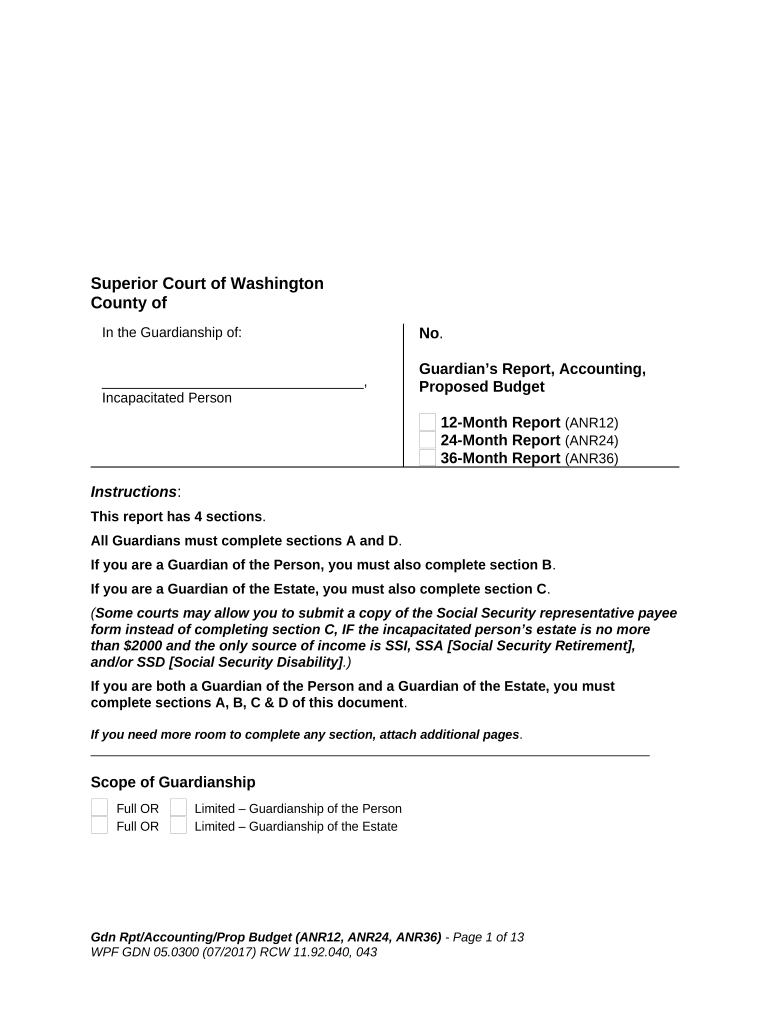
Superior Court of Washington County of In the Guardianship of: __________________________________, Incapacitated Person No . Guardian’s Report, Accounting, Proposed Budget 12-Month Report (ANR12) 24-Month Report (ANR24) 36-Month Report (ANR36) Instructions : This report has 4 sections . All Guardians must complete sections A and D . If you are a Guardian of the Person, you must also complete section B . If you are a Guardian of the Estate, you must also complete section C . ( Some courts may allow you to submit a copy of the Social Security representative payee form instead of completing section C, IF the incapacitated person’s estate is no more than $2000 and the only source of income is SSI, SSA [Social Security Retirement], and/or SSD [Social Security Disability] .) If you are both a Guardian of the Person and a Guardian of the Estate, you must complete sections A, B, C & D of this document . If you need more room to complete any section, attach additional pages . ________________________________________________________________________________ Scope of Guardianship Full OR Limited – Guardianship of the Person Full OR Limited – Guardianship of the Estate Gdn Rpt/Accounting/Prop Budget (ANR12, ANR24, ANR36) - Page 1 of 13 WPF GDN 05.0300 (07/2017) RCW 11.92.040, 043 General Information Section A – Completed by all Guardians _________________________________________________________________________________________________________ 1. Identity of Guardian, Incapacitated Person, and Standby Guardian Incapacitated Person Guardian Standby Guardian Full Name Mailing Address City & State Zip Code *Telephone *Fax Number Age 2. Date of Appointment and Reporting Period The Guardian was appointed on (date) _______________________. The last report of the Guardian was approved by the court on (date) ________________________. This report covers the period from _________________ through ______________________. The closing date for all reports is ______________________, and the Guardian is required to file reports within 90 days of that date. The Guardian is to file a report every 12 , 24 , 36 months . 3. Interested Parties (List each person who has filed a Request for Special Notice of Proceedings and those whom the Court has designated to receive copies of reports.) Name Mailing Address Relationship to Incapacitated Person 4. Interested Governmental Agencies ( Check each box that is applicable . ) The incapacitated person is a veteran of the United States Military who is receiving or has received veteran’s benefits and the Guardian of the estate manages those veteran’s benefits. Notice must be provided at least 15 days before the hearing to: The Department of Veteran’s Affairs: WAREA Fiduciary Hub, Department of Veteran Affairs, 550 Foothill Drive, P.O. Box 58086, Salt Lake City, UT 84158. (Check www.va.gov to verify the address is current.) (RCW 73.36.020). The incapacitated person is a Medicaid client of the Department of Social and Health Services (DSHS) who (1) pays Guardian’s fees; and (2) is required to contribute to Gdn Rpt/Accounting/Prop Budget (ANR12, ANR24, ANR36) - Page 2 of 13 WPF GDN 05.0300 (07/2017) RCW 11.92.040, 043 the cost of his or her care in a nursing home or other similar facility. Notice must be provided at least 10 days before the hearing to DSHS. (WAC 388-79-050). Other: . 5. Benefits Received The Guardian receives the following monthly benefits on behalf of the Incapacitated Person, in the following amounts: SSDI/SSA: $__________; Medicaid $__________; SSI: $__________; Medicare $__________; GAU: $__________; COPES $__________; VA Pension: $__________; TANF $__________; L&I Benefits: $__________; HUD $__________; Food Stamps $ _________; DDA $__________. Other – Specify: A Trust that reports to the court: the Trustee’s name, address, and court case number are: ___________________________________________________________________ A Trust that does not report to the court: the Trustee’s name, address: ___________________________________________________________________ 6. Inventory An inventory of all property of the Incapacitated Person’s estate at the commencement of the Guardianship is or is not on file herein. 7. Bond and Blocked Accounts There is or is not currently a bond in place in the amount of $__________________ (Bond No.: _______________). The total balance of assets in blocked accounts is $ ________________________. The total balance of assets in unblocked accounts is $ ______________________. The bond should remain or should be changed to $ ____________________. Assets in excess of the bond amount should be restricted (i.e. blocked) and should be subject to a Receipt of Funds into Blocked Financial Account, form WPF GDN 04.0600, on file with the court. 8. Guardian Fees Gdn Rpt/Accounting/Prop Budget (ANR12, ANR24, ANR36) - Page 3 of 13 WPF GDN 05.0300 (07/2017) RCW 11.92.040, 043 The Guardian is requesting fees and costs in the amount of $ ____________ for the period of ____________ through ____________. The Guardian has or has not received payments in the amount of $ _________ during this accounting period for their services. The Guardian has attached to this report (or has filed with this report) a separate itemized fee declaration that describes in detail: the services rendered, the time period that services were provided, the time required to provide the services, the requested rate of compensation, and the out of pocket costs incurred. The Guardian is requesting that the amount of $ ___________ be disbursed from the guardianship assets. During this accounting period the Guardian has performed the following duties: _________________________________________________________________________ _________________________________________________________________________ _________________________________________________________________________ _________________________________________________________________________ _________________________________________________________________________ _________________________________________________________________________. 9. Attorney Fees The Guardian has retained the services of the Law Offices of _______________________ _______________________________, and is requesting that fees and costs in the amount of $ _________________ for the time period of _____________________ through ________________________ be paid from guardianship assets. Attached in this report (or filed herewith) is a separate itemized fee declaration that describes the legal services provided. 10. Guardian’s Monthly Allowance Pursuant to RCW 11.92.180, the Guardian is requesting a monthly allowance for ongoing: (a) guardian fees and costs and (b) attorney fees and costs for services already performed. The amount of guardian fees and costs and attorney fees and costs for services performed for the previous accounting period totaled $___________. This is a monthly average of $ _____________. The actual monthly allowance that the guardian received during the previous accounting period was $ _____________. The guardian now requests a monthly allowance of $ ______________. This allowance (paid monthly) would be considered an “advance” on the fees and costs billed by the guardian, or its attorney, for services already performed. However, the total fees and costs billed (notwithstanding the allowance payments) should: (a) ultimately be subject to the review and approval of the court and (b) create no presumptions by the court or the guardian regarding the reasonableness, or necessity, of those fees and costs. Said monthly allowance should be made effective as of (date) _____________________________. 11. Lay Guardian Training Does not apply. The guardian is a certified professional guardian or financial institution. (Name of guardian) __________________successfully completed the required lay guardian training. The certificate of completion is is not on file with the court or attached. Gdn Rpt/Accounting/Prop Budget (ANR12, ANR24, ANR36) - Page 4 of 13 WPF GDN 05.0300 (07/2017) RCW 11.92.040, 043 The court waived (name of guardian) ________________’s requirement to complete lay guardian training. The guardian or limited guardian was required to complete additional or updated training. (Name of guardian) ____________________ successfully completed this additional or updated training. The certificate of completion is is not on file with the court or attached. 12. Court Approval The guardian petitions the court for approval of this report. Guardian of the Person Section B – to be completed by the Guardian of the Person . __________________________________________________________________________ 13. Status Report a. Status The Guardian believes that the Incapacitated Person is receiving satisfactory care or the Guardian has the following concerns for which a change is requested: __________________________________________________________ __________________________________________________________________ __________________________________________________________________ _________________________________________________________________. b. Change in Residence The following changes in residence of the Incapacitated Person occurred during the reporting period:_________________________________ _________________________ _______________________________________________________________________ . c. Medical Condition The medical condition of the Incapacitated Person including any changes during the reporting period: _______________________________________________________________________ _______________________________________________________________________ _______________________________________________________________________ _______________________________________________________________________. d. Mental Condition The mental condition of the Incapacitated Person including any changes during the reporting period: Gdn Rpt/Accounting/Prop Budget (ANR12, ANR24, ANR36) - Page 5 of 13 WPF GDN 05.0300 (07/2017) RCW 11.92.040, 043 Note: If there exists a mental health professional report on the status of the Incapacitated Person, you must file it with the court. To protect privacy, it should be filed in a restricted access file, using the “Sealed Confidential Guardianship Document Cover Sheet, form GDN 03.0200.” _______________________________________________________________________ _______________________________________________________________________. e. Functional Ability A description of the functional abilities of the Incapacitated Person including any changes during the reporting period: _______________________________________________________________________ _______________________________________________________________________ _______________________________________________________________________ _______________________________________________________________________. f. Guardian’s Activities on Behalf of the Incapacitated Person The following is a description of the Guardian’s activities for the benefit of the Incapacitated Person: . g. Recommended Changes in Scope of the Guardian’s Authority The scope of the Guardian’s authority should remain the same, or should be changed as follows: . h. Names of Professionals Who Have Aided the Incapacitated Person The following professionals have assisted the Incapacitated Person during the period covered by this report: Name Service Provided ________________________________ ___________________________________. ______________________________ _________________________________. ______________________________ _________________________________. i. Guardian’s Plan for Future Care Gdn Rpt/Accounting/Prop Budget (ANR12, ANR24, ANR36) - Page 6 of 13 WPF GDN 05.0300 (07/2017) RCW 11.92.040, 043 The Guardian’s care plan remains the same, or is changed as follows: . Guardian of the Estate Section C – to be completed by the Guardian of the Estate . ____________________________________________________________________________________ 14. Proposed Budget The Guardian of the Estate seeks authority to make expenditures for the Incapacitated Person according to the following proposed budget: a. Monthly Expenditures for the Incapacitated Person Current Proposed Comments Room and Board – up to $__________ $__________ Personal and Incidental Allowance Up to $__________ $__________ Medical/Dental Insurance $__________ $__________ Other: ________ $__________ $__________ Other: ________ $__________ $__________ Other: ________ $__________ $__________ Guardian’s Allowance $__________ $__________ Total Proposed Monthly Expenditures $__________ $__________ X 12 = $_______ per year Gdn Rpt/Accounting/Prop Budget (ANR12, ANR24, ANR36) - Page 7 of 13 WPF GDN 05.0300 (07/2017) RCW 11.92.040, 043 b. Medical and Dental Expenses The Guardian should be permitted to incur and pay reasonable and necessary medical and dental expenses that the Guardian determines to be in the best interest of the Incapacitated Person. c. Income Tax Payments The Guardian may be required to file federal income tax returns and pay income tax due on Guardianship income and should be permitted to pay any tax owed and fees incurred for accounting services required in connection with the preparation of income tax returns. d. Supplemental Annual Allowance The Guardian should be permitted to provide a supplemental allowance one time per calendar year of up to $ ______________, to the Incapacitated Person (e.g. at holiday time) provided adequate funds are available. e. Clothing Allowance The Guardian should be permitted to provide a clothing allowance of up to $ _____________ per calendar year ($500.00 per year if not filled in), provided adequate funds are available; f. Miscellaneous Expenses The Guardian should be permitted to make disbursements in an amount not to exceed $ _____________ ($500.00 if not filled in) on any one expenditure, from guardianship assets for miscellaneous and necessary items that appear to be reasonable and in the best interest of the Incapacitated Person, without prior approval, to a maximum of $ __________ ($1,500.00 if not filled in) per year without further order of the Court; g. Other The Guardian should be permitted to disburse $ _____________ for ___________ . 15. Balance Sheet Gdn Rpt/Accounting/Prop Budget (ANR12, ANR24, ANR36) - Page 8 of 13 WPF GDN 05.0300 (07/2017) RCW 11.92.040, 043 (This section can be an attachment if more convenient. The purpose of this section is to provide a listing of the assets and liabilities at the start and the end of the accounting period.) Market Value at Market Value at End of Start of Accounting Accounting Date: ___________ Date: ____________ Assets a. Real Property 1. __________________ $ $ 2. __________________ $ $ 3. __________________ $ $ b. Receivables (Mortgages, Liens, Notes payable to the Incapacitated Person, the Estate, or Trust.) 1. _________________ $ $ 2. _________________ $ $ 3. _________________ $ $ c. Unblocked Liquid Assets (Investment Accounts, Stocks, Bonds, Securities, IRA, Cash.) 1. Financial Institution Address Address City, WA Zip a. Interest Checking Account Account No.: last 4 digits ____ $ __________ $ __________ (Balance as of __________) b. Savings Account Account No.: last 4 digits ____ $ __________ $ __________ (Balance as of __________) 2. Financial Institution Address Address City, WA Zip a. Certificate of Deposit Account No.: last 4 digits _____ Interest Rate : _______% Gdn Rpt/Accounting/Prop Budget (ANR12, ANR24, ANR36) - Page 9 of 13 WPF GDN 05.0300 (07/2017) RCW 11.92.040, 043 Maturity Date: ________ $ __________ $ ___________ (Balance as of __________) Total Unblocked $ __________ $ ___________ d. Blocked Liquid Assets ( Investment Accounts, Stocks, Bonds, Securities, IRA, Cash in accounts where access to that account is already restricted by a restrictive agreement on file with the Court, and access to that account requires receipt by the institution of a court order authorizing access. ) 1. Financial Institution Address Address City, WA Zip a. Certificate of Deposit Account No.: last 4 digits _____ Interest Rate : _______% Maturity Date : ________ $ __________ $ ___________ (Balance as of __________) b. Certificate of Deposit Account No.: last 4 digits _____ Interest Rate : _______% Maturity Date : ________ $ __________ $ ___________ (Balance as of __________) 2. Financial Institution Address Address City, WA Zip a. Certificate of Deposit Account No.: last 4 digits _____ Interest Rate : _______% Maturity Date : ________ $ __________ $ ___________ (Balance as of __________) Total Blocked $ __________ $ ___________ e. Personal and Other Property (Household Goods, Vehicles, Burial Plots, Funeral Plans, Life Insurance.) Gdn Rpt/Accounting/Prop Budget (ANR12, ANR24, ANR36) - Page 10 of 13 WPF GDN 05.0300 (07/2017) RCW 11.92.040, 043 1.__________ $ __________ $ ___________ 2.__________ $ __________ $ ___________ Total Assets $ __________ $ ___________ Liabilities Mortgages and Liens ________________ $ __________ $ __________ ________________ $ __________ $ __________ ________________ $ __________ $ __________ Loan # _________ $ __________ $ __________ Total Liabilities $ __________ $ __________ Total Estate $ __________ $ __________ Market Value at Market Value at Start of Accounting End of Accounting (See 15. above) (See 15. above) Note : You should file with this report ( using the Sealed Confidential Guardianship Document Cover Sheet, WPF GDN 03.0200 ) the statements ( such as monthly financial institution statements ) that verify the balance of the accounts that are listed above. For the assets that are listed above as “blocked liquid assets” you should include copies of the blocking agreement, restrictive agreement or receipts that you received from the institutions holding those assets, which establish that your access to them is restricted. 16. Estate Information For Accounting Period Starting (date) ______________________ and ending (date) ________________. (The purpose of this section is to compare the value of the estate at the beginning of the accounting period with the receipts, disbursements and adjustments (if any) made during the accounting period.) The ending value of the estate should equal: a. the Total Market Value of the estate at the beginning of the account period, (plus) b. the Total Receipts during the accounting period, (minus) c. the Total Disbursement during the accounting period, (plus or minus), d. any Adjustments to the Market Value of the Estate. (a. +b. –c. +/- d. = e.) a. Total Assets at Market Value as of the beginning of review period $ __________ b. Total Receipts $ __________ Gdn Rpt/Accounting/Prop Budget (ANR12, ANR24, ANR36) - Page 11 of 13 WPF GDN 05.0300 (07/2017) RCW 11.92.040, 043 Write total amount for entire accounting period. Do not use monthly amount. Income : Social Security (SSA) $ SSI $ VA/Railroad/CSA Pension $ Retirement Pension $ Wages $ Interest and Dividends $ Other $ c. Total Disbursements (Payments) $ _________ Disbursements : Room and Board (Rent, Nursing Home, Family Home) $ Personal Funds $ Entertainment & Travel $ Transportation (mileage, bus pass, taxi scrip, etc.) $ Medical and Dental $ Guardian Fees (if allowed) $ Attorney Fees $ Other: $ d. Adjustments +/-$ _________ (Net gain/loss in value of assets over accounting period.) e. Ending Market Value as of closing date of accounting period $ __________ (Amount in line 16a. $_____________ plus amount in line 16b. +$_____________ Equals $_____________ minus amount in line 16c. - $_____________ Equals $_____________ plus or minus amount in line 16d. +/- $_____________ Equals = $_____________ Should equal 16e. If the last line does not equal line 16e., your account does not balance. The account must balance to be approved by the court.) 17. Explanations Explain any large or unusual expenditures, adjustments, or purchases: Gdn Rpt/Accounting/Prop Budget (ANR12, ANR24, ANR36) - Page 12 of 13 WPF GDN 05.0300 (07/2017) RCW 11.92.040, 043 . Verification Section D – ( to be completed by All Guardians . ) Dated: ____________________________________. I certify (or declare) under penalty of perjury under the laws of the state of Washington that to the statements in this report are true and correct, that I (we) hereby petition the court for approval of same, and request that the court direct the clerk of the court to reissue letters of guardianship consistent with the designation made herein. Signed at (city) ____________________ , (state) _______, on (date) _____________________. ________________________________ __________________________ ____________ Signature of Guardian Print Name of Guardian [ ]WSBA [ ]CPG# Gdn Rpt/Accounting/Prop Budget (ANR12, ANR24, ANR36) - Page 13 of 13 WPF GDN 05.0300 (07/2017) RCW 11.92.040, 043

Useful suggestions for finalizing your ‘Guardian Washington’ online

Are you fed up with the inconvenience of handling paperwork? Look no further than airSlate SignNow, the premier eSignature solution for individuals and businesses. Bid farewell to the monotonous task of printing and scanning documents. With airSlate SignNow, you can effortlessly finalize and endorse documents online. Take advantage of the comprehensive features embedded in this intuitive and affordable platform and transform your method of paperwork administration. Whether you need to approve documents or gather signatures, airSlate SignNow manages everything efficiently, with just a few clicks.

Adhere to this detailed guide:

  1. Log into your account or register for a complimentary trial with our service.
  2. Click +Create to upload a file from your device, cloud, or our template repository.
  3. Open your ‘Guardian Washington’ in the editor.
  4. Click Me (Fill Out Now) to finish the form on your end.
  5. Add and designate fillable fields for others (if necessary).
  6. Proceed with the Send Invite settings to request eSignatures from others.
  7. Save, print your version, or convert it into a reusable template.

No need to worry if you need to collaborate with your coworkers on your Guardian Washington or send it for notarization—our platform has everything you require to complete such tasks. Register with airSlate SignNow today and take your document management to the next level!

Here is a list of the most common customer questions. If you can’t find an answer to your question, please don’t hesitate to reach out to us.

Need help? Contact Support

The best way to complete and sign your guardian washington form

Save time on document management with airSlate SignNow and get your guardian washington form eSigned quickly from anywhere with our fully compliant eSignature tool.

How to Sign a PDF Online How to Sign a PDF Online

How to fill out and sign forms online

In the past, working with paperwork required lots of time and effort. But with airSlate SignNow, document management is fast and easy. Our robust and easy-to-use eSignature solution lets you easily complete and eSign your guardian washington form online from any internet-connected device.

Follow the step-by-step guide to eSign your guardian washington form template online:

  • 1.Sign up for a free trial with airSlate SignNow or log in to your account with password credentials or SSO authentication.
  • 2.Click Upload or Create and import a file for eSigning from your device, the cloud, or our form library.
  • 3.Click on the file name to open it in the editor and use the left-side menu to fill out all the empty fields appropriately.
  • 4.Put the My Signature field where you need to eSign your sample. Type your name, draw, or import a photo of your handwritten signature.
  • 5.Click Save and Close to finish modifying your completed document.

Once your guardian washington form template is ready, download it to your device, save it to the cloud, or invite other individuals to electronically sign it. With airSlate SignNow, the eSigning process only requires a couple of clicks. Use our robust eSignature tool wherever you are to deal with your paperwork productively!

How to Sign a PDF Using Google Chrome How to Sign a PDF Using Google Chrome

How to complete and sign paperwork in Google Chrome

Completing and signing documents is simple with the airSlate SignNow extension for Google Chrome. Installing it to your browser is a quick and beneficial way to manage your paperwork online. Sign your guardian washington form sample with a legally-binding electronic signature in a couple of clicks without switching between programs and tabs.

Follow the step-by-step guide to eSign your guardian washington form in Google Chrome:

  • 1.Go to the Chrome Web Store, search for the airSlate SignNow extension for Chrome, and add it to your browser.
  • 2.Right-click on the link to a form you need to approve and select Open in airSlate SignNow.
  • 3.Log in to your account with your password or Google/Facebook sign-in buttons. If you don’t have one, sign up for a free trial.
  • 4.Utilize the Edit & Sign menu on the left to complete your template, then drag and drop the My Signature option.
  • 5.Insert a picture of your handwritten signature, draw it, or simply type in your full name to eSign.
  • 6.Make sure all data is correct and click Save and Close to finish editing your form.

Now, you can save your guardian washington form sample to your device or cloud storage, send the copy to other people, or invite them to eSign your document via an email request or a secure Signing Link. The airSlate SignNow extension for Google Chrome improves your document workflows with minimum time and effort. Try airSlate SignNow today!

How to Sign a PDF in Gmail How to Sign a PDF in Gmail How to Sign a PDF in Gmail

How to fill out and sign forms in Gmail

Every time you get an email with the guardian washington form for approval, there’s no need to print and scan a document or download and re-upload it to a different program. There’s a better solution if you use Gmail. Try the airSlate SignNow add-on to promptly eSign any paperwork right from your inbox.

Follow the step-by-step guidelines to eSign your guardian washington form in Gmail:

  • 1.Visit the Google Workplace Marketplace and find a airSlate SignNow add-on for Gmail.
  • 2.Install the tool with a corresponding button and grant the tool access to your Google account.
  • 3.Open an email containing an attached file that needs approval and use the S key on the right sidebar to launch the add-on.
  • 4.Log in to your airSlate SignNow account. Choose Send to Sign to forward the file to other parties for approval or click Upload to open it in the editor.
  • 5.Place the My Signature field where you need to eSign: type, draw, or import your signature.

This eSigning process saves time and only takes a couple of clicks. Use the airSlate SignNow add-on for Gmail to update your guardian washington form with fillable fields, sign forms legally, and invite other people to eSign them al without leaving your mailbox. Improve your signature workflows now!

How to Sign a PDF on a Mobile Device How to Sign a PDF on a Mobile Device How to Sign a PDF on a Mobile Device

How to fill out and sign documents in a mobile browser

Need to rapidly fill out and sign your guardian washington form on a smartphone while doing your work on the go? airSlate SignNow can help without needing to set up additional software programs. Open our airSlate SignNow tool from any browser on your mobile device and create legally-binding electronic signatures on the go, 24/7.

Follow the step-by-step guide to eSign your guardian washington form in a browser:

  • 1.Open any browser on your device and go to the www.signnow.com
  • 2.Create an account with a free trial or log in with your password credentials or SSO authentication.
  • 3.Click Upload or Create and add a file that needs to be completed from a cloud, your device, or our form collection with ready-to go templates.
  • 4.Open the form and fill out the blank fields with tools from Edit & Sign menu on the left.
  • 5.Add the My Signature field to the form, then enter your name, draw, or add your signature.

In a few easy clicks, your guardian washington form is completed from wherever you are. When you're done with editing, you can save the document on your device, generate a reusable template for it, email it to other individuals, or invite them electronically sign it. Make your documents on the go speedy and efficient with airSlate SignNow!


How to Sign a PDF on iPhone How to Sign a PDF on iPhone

How to fill out and sign forms on iOS

In today’s business world, tasks must be done rapidly even when you’re away from your computer. With the airSlate SignNow application, you can organize your paperwork and sign your guardian washington form with a legally-binding eSignature right on your iPhone or iPad. Set it up on your device to conclude agreements and manage forms from just about anywhere 24/7.

Follow the step-by-step guide to eSign your guardian washington form on iOS devices:

  • 1.Open the App Store, find the airSlate SignNow app by airSlate, and install it on your device.
  • 2.Open the application, tap Create to upload a form, and choose Myself.
  • 3.Select Signature at the bottom toolbar and simply draw your autograph with a finger or stylus to eSign the sample.
  • 4.Tap Done -> Save right after signing the sample.
  • 5.Tap Save or utilize the Make Template option to re-use this document in the future.

This method is so straightforward your guardian washington form is completed and signed within a couple of taps. The airSlate SignNow app works in the cloud so all the forms on your mobile device are kept in your account and are available whenever you need them. Use airSlate SignNow for iOS to enhance your document management and eSignature workflows!


How to Sign a PDF on Android How to Sign a PDF on Android

How to complete and sign paperwork on Android

With airSlate SignNow, it’s easy to sign your guardian washington form on the go. Install its mobile application for Android OS on your device and start enhancing eSignature workflows right on your smartphone or tablet.

Follow the step-by-step guide to eSign your guardian washington form on Android:

  • 1.Open Google Play, search for the airSlate SignNow app from airSlate, and install it on your device.
  • 2.Log in to your account or create it with a free trial, then import a file with a ➕ button on the bottom of you screen.
  • 3.Tap on the uploaded file and choose Open in Editor from the dropdown menu.
  • 4.Tap on Tools tab -> Signature, then draw or type your name to electronically sign the template. Fill out empty fields with other tools on the bottom if required.
  • 5.Use the ✔ button, then tap on the Save option to finish editing.

With a user-friendly interface and total compliance with primary eSignature standards, the airSlate SignNow application is the perfect tool for signing your guardian washington form. It even operates offline and updates all form modifications when your internet connection is restored and the tool is synced. Complete and eSign documents, send them for approval, and generate multi-usable templates anytime and from anyplace with airSlate SignNow.

Sign up and try Guardian washington form
  • Close deals faster
  • Improve productivity
  • Delight customers
  • Increase revenue
  • Save time & money
  • Reduce payment cycles







